bitpro가 원문에서 글자만 모은 내용이에요. 표·그림·수식은 빠지거나 깨질 수 있어요. 전체 75쪽 중 34쪽
an is called, the loan is impaired, or any combination thereof. To compose these virtual variables, an internal helper function called `_dueDates()` is used.
### `_dueDates()`
Returns the due dates for `callDueDate`, `impairedDueDate` and `normalDueDate`
#### `callDueDate`
$$
\ \text{callDueDate} = \begin{cases} \text{dateCalled + noticePeriod} & \text{if } \text{dateCalled} > 0 \ 0 & \text{if } \text{dateCalled} = 0 \end{cases} \
$$
#### `impairedDueDate`
$$
\ \text{impairedDueDate} = \begin{cases} \text{dateImpaired} & \text{if } \text{dateImpaired} > 0 \ 0 & \text{if } \text{dateImpaired} = 0 \end{cases} \
$$
#### `normalDueDate`
$$paidOrFundedDate = \max(datePaid, dateFunded)$$
$$
\ \text{normalDueDate} = \begin{cases} \text{paidOrFundedDate + paymentInterval} & \text{if } \text{paidOrFundedDate} > 0 \ 0 & \text{if } \text{paidOrFundedDate} = 0 \end{cases} \
$$
### `paymentDueDate()`
$$paymentDueDate = \min(callDueDate, impairedDueDate, normalDueDate)$$
### `_defaultDates()`
Returns the due dates for `callDefaultDate`, `impairedDefaultDate` and `normalDefaultDate`
#### `callDefaultDate`
$$callDefaultDate = callDueDate$$
#### `impairedDefaultDate`
$$
\ \text{impairedDefaultDate} = \begin{cases} \text{impairedDueDate + gracePeriod} & \text{if } \text{impairedDueDate} > 0 \ 0 & \text{if } \text{impairedDueDate} = 0 \end{cases} \
$$
#### `normalDefaultDate`
$$
\ \text{normalDefaultDate} = \begin{cases} \text{normalDueDate + gracePeriod} & \text{if } \text{normalDueDate} > 0 \ 0 & \text{if } \text{normalDueDate} = 0 \end{cases} \
$$
### `defaultDate()`
$$defaultDate = \min(callDefaultDate, impairedDefaultDate, normalDefaultDate)$$
## Loan Calls
The lender exclusively has the ability to commence a Loan Call, specifying the principal amount that must not exceed the current principal balance. In the event of partial Loan Calls, the loan continues with a reduced balance but the same terms. Conversely, a complete Loan Call leads to the loan maturing once the borrower repays. Upon a Loan Call by the lender, the borrower is obligated to settle the demanded amount within the Notice Period or risk the loan defaulting.
The lender can also withdraw a Loan Call, which reverts the payment schedule back to its original state prior to the Loan Call. If a Loan Call is made on a late loan, the lender can default the loan at the termination of either the Notice Period or the Grace Period, depending on which comes first.
It's worth noting that refinancing is considered a valid resolution to Loan Calls, with such calls being settled once the parties agree to new terms.
## Fees
Open-Term Loans have `delegateServiceFees` and `platformServiceFees` which are prorated and calculated on each payment.
## Closing Loan
If a borrower wants to close a loan, they can do so by calling `makePayment` with `principalToReturn` equal to the outstanding principal.
Note: `makePayment` is permissionless. Any address can pay on behalf of the borrower by transferring funds via `transferFrom` to the lender; typical usage is the borrower calling directly.
## Initialization Parameters
* `borrower` - The address of the borrower.
* `lender` - The address of the lender.
* `fundsAsset` - The address of asset that the loan is denominated in.
* `gracePeriod` - The amount of time that the lender needs to wait before triggering a default on a late loan.
* `noticePeriod` - The maximum amount of required for the Borrower fulfill a loan call.
* `paymentInterval` - The amount of seconds between each loan payment.
* `interestRate` - The annualized interest rate.
* `lateFeeRate` - A fee rate applied on principal amount on late payments.
* `lateInterestPremiumRate` - A premium added on top of the interest rate for late payments.
* `delegateServiceFeeRate` - A rate of funds assets that is added on every payment destined to the pool delegate.
# Refinancing
## Refinance Actions
Both for Open-Term and Fixed-Term Loans, refinancing is defined as the revision of Loan terms, as per an agreement between the two parties involved with the Loan: the Borrower and Lender. The following actions can be performed in any permutation desired:
* Increase principal: Increases `principal`, `principalRequested`, and `drawableFunds` by a given `amount`, requires additional funds to be added by the Lender
* Decrease `principal`, only for Open Term Loans
* Set `collateralRequired`
* Set `closingRate`
* Set `endingPrincipal`: Must be less than current `principal` on Loan
* Set `gracePeriod`
* Set `noticePeriod`
* Set `interestRate`
* Set `lateFeeRate`
* Set `lateInterestPremiumRate`
* Set `paymentInterval`
* Set `paymentsRemaining`
Note that the Refinancer contract should never set the collateralAsset or fundsAsset and should never directly set `drawableFunds`, `principal` or `collateral`.
## Refinance Procedure
In order to facilitate a refinance, an agreement must be reached on-chain between the Lender and Borrower. This is performed using two functions:
#### `proposeNewTerms()`
This function is called by the Borrower for Fixed-Term Loans and by the Lender on Open-Term ones, passing in the smart contract address of the Refinancer contract, as well as an array of ABI-encoded function calls.
For example:
```js
bytes[] memory data = new bytes[](4);
data[0] = abi.encodeWithSignature("setCollateralRequired(uint256)", newCollateralRequired_);
data[1] = abi.encodeWithSignature("setEndingPrincipal(uint256)", newEndingPrincipal_);
data[2] = abi.encodeWithSignature("setInterestRate(uint256)", newInterestRate_);
data[3] = abi.encodeWithSignature("increasePrincipal(uint256)", principalIncrease_);
loan.proposeNewTerms(address(refinancer), data);
```
This function will take the hash of these changes and the Refinancer smart contract address (`keccak256(abi.encode(refinancer_, calls_))`), and save it into storage in the Loan.
#### `acceptNewTerms()`
This function is called the other party, the Lender, through the `Loan Manager`, in Fixed-Term and the Borrower in Open-Term. In the call, the same parameters are passed to agree to the terms, the smart contract address of the Refinancer and the array of ABI-encoded function calls.
This function calculates the hash again (`keccak256(abi.encode(refinancer_, calls_))`) and compares it with the hash that was added to storage when `proposeNewTerms()` was called.
If the hashes match, the function calls are executed in a for loop as delegatecalls to the Refinancer contract, manipulating storage in the context of the Loan:
```js
for (uint256 i; i < calls_.length; ++i) {
( bool success, ) = refinancer_.delegatecall(calls_[i]);
require(success, "MLI:ANT:FAILED");
}
```
Once all of these execute successfully, the collateral ratio is checked to make sure it is maintained, after which the refinance is considered complete.
# Impairments
## Overview
For both Loan types, in the situation where a Borrower is discovered to be unable to make an upcoming payment (e.g., they are discovered to be insolvent), impairment allows the Pool to recognize a "paper loss" (`unrealizedLoss`). This is useful to prevent large liquidity events in the Pool when the Borrowers default is far enough in the future that Liquidity Providers are able to exit the Pools before they occur.
When `impairLoan` is called on the **PoolManager** contract, the principal and any expected interest due up to the `impairLoan` call is made or payment due date (which ever is earlier) is added to the Pool's `unrealizedLosses`. `unrealizedLosses` is factored into the Pool's value for withdrawals, incentivizing current Liquidity Providers to remain in the Pool until the impairment is resolved.
In addition, the payment due date of the Loan is set to either the current timestamp or the existing payment due date, whichever is earlier. This immediately puts the Borrower in arrears if they were before their payment due date, which allows the Pool Delegate to effectuate a default more quickly.
## Outcomes
When a Loan is impaired, there are three possible outcomes to resolve the impairment. All three situations result in a more favourable outcome to the Liquidity Provider than exiting immediately.
### Manual Impairment Reversion
A Loan impairment can be removed manually, meaning that the principal and owed interest are deducted from the `unrealizedLosses` and added to the `principalOut` and `accountedInterest` respectively. This is performed through a call to `removeLoanImpairment` that can be made either by the Pool Delegate or the Governor. In this situation, the Loan payment schedule reverts to its original state, and the Pool accounting reverts back to its regular state.
### Reversion by Payment or Refinance
If a Borrower is able to make a full payment according to the Loan schedule, or the Borrower and Pool Delegate reach an agreement and are able to refinance the Loan, the impairment is removed. In this case the loan state is updated normally, setting the next payment due date a full payment interval from either the refinance or the impairment date in the case of a regular payment. The Pool removed `unrealizedLosses` and continues normal operation.
### Loan Default
In the case that the Borrower is unable to make the payment, the Loan can be defaulted. This will reduce the `unrealizedLosses` value, and will realize the loss in the Pool by reducing `principalOut` and `accountedInterest` by the value tracked in the Loan. Any collateral and cover available will go towards reducing losses in the Pool.
Example scenario with an impairment [here](/technical-resources/pools/accounting/pool-accounting).
### Access Control
Both the Pool Delegate and Governor are allowed to impair a Loan at any given time. If the Governor impairs the Loan, the Pool Delegate DOES NOT have the right to revert the impairment. If the Pool Delegate impairs the Loan, the Governor DOES have the right to revert the impairment.
### Open Term Loans Impairments
For Open Term Loans a loan will first be called operationally before it is impaired. This ensures the next payment due is for the full principal amount.
# Defaults
## Overview
For both Loan types, whenever a Borrower is no longer able to meet their obligations, the Pool Delegate and Governor have the option to trigger a default. This process realizes the Loan's losses and adjust the Pool accounting accordingly.
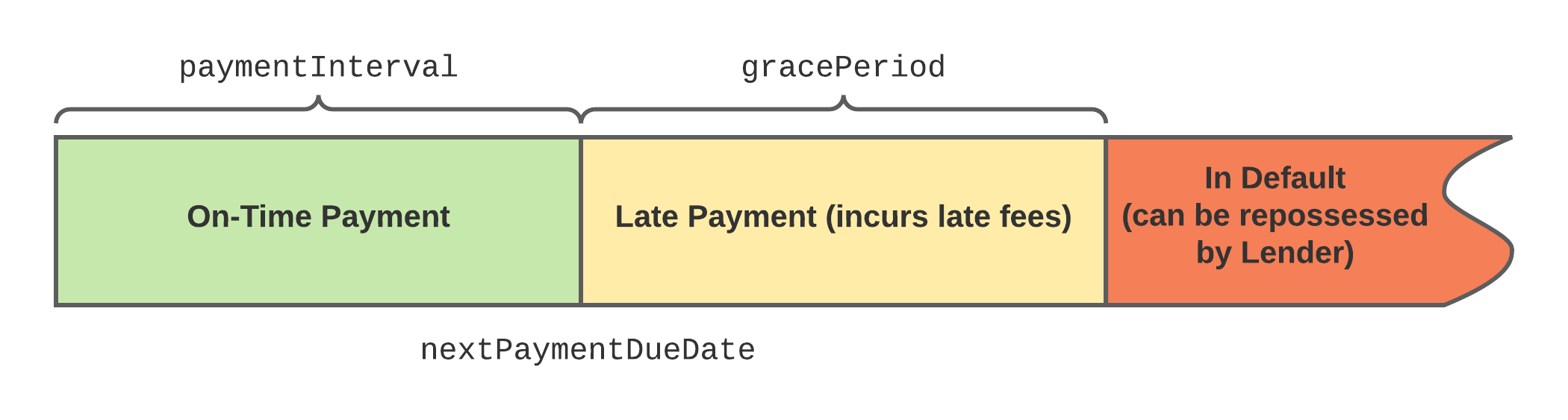
Every Loan has a defined payment interval which determines when payments are expected to be made by the Borrower. If the Borrower does not make a payment before the expected due date, there is a grace period during which they can make a late payment. After the grace period passes the loan is considered to be in default, and the Pool Delegate has the *option* to repossess the Loan and begin the liquidation process by calling `triggerDefault()`.
These conditions are illustrated in the diagram below.
## Loss Accounting
When a Loan is defaulted, the losses must be recognized in the Pool's accounting. This happens in the following steps:
1. Decrease `principalOut` by the full outstanding principal of the Loan. This will decrease `totalAssets` by the same amount.
2. Accrue all Loans' interest to the current timestamp and remove all interest that has accrued against the defaulted loan. This will reduce `totalAssets` by the full the outstanding interest amount in the defaulted Loan.
3. If the Loan has collateral, repossess it and represent the principal and interest value of the Loan as `unrealizedLosses` in the Pool.
4. If the Loan has collateral, liquidate all collateral posted against the Loan. This will increase `totalAssets` by the total amount of cash that is recovered from the liquidation.
5. Liquidate first-loss capital posted against the Pool. This will increase `totalAssets` by the total amount of cash that is recovered.
The below example will illustrate how this affects accounting in practice.
```
## Starting State
principalOut = 10_000
outstandingInterest = 200
cash = 3_000
unrealizedLosses = 0
first loss capital = 500
totalAssets = 10_000 + 200 + 3_000
= 13_200
loan principal = 4_000
loan interest = 100
loan collateral = 400
## Default (Pre-Liquidation)
principalOut = 10_000
outstandingInterest = 200
cash = 3_000
unrealizedLosses = 4_000 + 100
unrealizedLosses = 4_100
first loss capital = 500
totalAssets = 13_200
totalAssets - unrealizedLosses = 9_100
loan principal = 0
loan interest = 0
loan collateral = 0
## Default (Post-Liquidation)
principalOut = 6_000
outstandingInterest = 100
cash = 3_000 + 500 + 400
cash = 3_900
unrealizedLosses = 0
first loss capital = 0
totalAssets = 6_000 + 100 + 3_900
totalAssets = 10_000
loan principal = 4_000
loan interest = 100
loan collateral = 400
```
## Fund Recovery
When a loan is defaulted, some amount of capital can be recovered through the mechanics of cover and liquidation. When that happens, the protocol enforces an order to which the funds will be directed. All liquidated collateral and cover first goes towards recovering fees owed to the protocol, after which all funds are returned to the Pool. The Pool Delegate does not recover any fees owed during a Loan default.
## First-Loss Capital (Unused)
*Note this aspect of the protocol isn't used as the Pool Delegate Cover is unused due to most pool's being managed by Maple Direct.*
Each Pool maintains a reserved amount of liquidity whose main purpose is to serve as first-loss capital in case defaults occur. This liquidity is provided by the Pool Delegate and is used to make up for the losses still remaining after the Loan collateral is liquidated. This mechanism is in place to align incentives between the Pool Delegate and LPs. An additional setting (`maxCoverLiquidationPercent`) can also be set on a per-pool basis by the Governor, which defines the maximum percentage of pool cover used when covering for losses.
## Uncollateralized Loans
In the case of an uncollateralized Loan default, no collateral auctioning procedure is required, so the default can be completed atomically. In this case, the losses owed to the platform and Pool are calculated and cover is liquidated up to the `maxCoverLiquidationPercent`. Remaining losses are represented to LPs as a decrease in `totalAssets`.
## Collateralized Loans
In the case of a collateralized Loan default, a two-step procedure must be conducted.
1. The collateral must be repossessed and put up for liquidation.
2. The liquidation must be finalized, taking the resulting funds, calculating the remaining losses and liquidating cover liquidated up to the `maxCoverLiquidationPercent`. Remaining losses are represented to LPs as a decrease in `totalAssets`.
# Maple Protocol Pools: Overview
# Pool Smart Contract Reference
## Overview
The Pool contract is the core unit that keeps tracks of liquidity provider shares and funds, including token transfer capabilities. It's the only necessary contract for depositors to interact with and it contains all necessary functions to enter and exit positions. It is an immutable contract that contains the minimum necessary logic to allow for a high degree of flexibility in future development of the protocol.
The pool contract is an implementation of a Tokenized Vault Standard ([ERC-4626](https://erc4626.info/)), implementing the full interface defined in the [specification](https://eips.ethereum.org/EIPS/eip-4626).
### Call Gating & Permissions
All state-changing Pool calls are gated by the `PoolManager` via a `checkCall` modifier that delegates to `PoolManager.canCall(functionId, caller, args)`. Common function identifiers include `P:deposit`, `P:depositWithPermit`, `P:mint`, `P:mintWithPermit`, `P:redeem`, `P:requestRedeem`, and `P:removeShares`. The `PoolPermissionManager` config (allowlist/bitmaps/levels) ultimately determines which addresses can call which Pool functions.
## Permits
As a convenience, Pools implements the `depositWithPermit` and `mintWithPermit` that allows users to deposit performing a single transaction and not needing to approve tokens beforehand. This is an extension of the current ERC-4626 vault standard.
## Maple Specific Behaviors
Although Pools were built to be maximally compliant with the tokenized vault standard, a few behavioral exceptions were necessary to adhere to Maple's use case.
## Withdrawals
Exiting the pool by **calling `withdraw` is NOT encouraged**, as the recommended method to exit is through `redeem`. This is due to the accruing mechanism used along with the fact that the current WithdrawalManager implementation enforces that the full **share** amount withdrawn must match the amount requested for withdrawal. Since the value of the LP tokens accrues every block, the number of shares that corresponds to the withdrawal amount is continuously decreasing and will result in a different value depending on when the block is mined. It is therefore encouraged that users exit by calling `redeem` with the number of shares that they would like to exit with.
## Redeem
In order to exit from a Pool, an LP must first call `requestRedeem` before they can call `redeem`. This function moves the LP's shares to another contract and subjects them to the specific withdrawal mechanism. More details on the current WithdrawalManager mechanism are included [here](/technical-resources/withdrawal-managers/withdrawal-manager-queue).
Once the conditions contained in the WithdrawalManager are met, the users can call `redeem` and burn their LP shares for cash. Depending on the withdrawal mechanism the funds asset may be sent directly to the user.
**NOTE:** View functions, like `maxRedeem`, `maxWithdraw`, `previewRedeem` and `previewWithdraw`, returns values compliant to the withdrawal mechanism, meaning if that a given user is not allowed to redeem at the current time, it'll return `0`. If the user is able to redeem, it'll return the redeemable amount.
## Removing Shares
This function can be used if a `requestRedeem` was previously called, but the users wants to cancel the request and get their shares back. Note that this function is also subjected to the specific withdrawal logic defined in the WithdrawalManager in use.
## Bootstrap Mint
Pools may be initialized with a one-time `BOOTSTRAP_MINT` to seed supply for arithmetic stability. The first mint operation effectively receives `shares - BOOTSTRAP_MINT` and an event is emitted. This is expected and has no ongoing effect after initialization.
# Pool Creation
## Overview
The PoolDeployer contract facilitates the atomic deployment and initialization of the contracts necessary to run a Pool:
* `PoolManager`, which itself deploys the `Pool` and acts as the hub for configuration and strategy attachment
* `WithdrawalManager (Queue)`
The `deployPool` function in the PoolDeployer contract handles deployment of the PoolManager/Pool, the queue‑based Withdrawal Manager, and strategy instances.
## Pre-Requisite Transactions
The following pre-requisite configurations are necessary in order to deploy a Pool in the Maple protocol.
1. Deploying address is a valid Pool Delegate in `MapleGlobals`.
2. The provided `PoolManagerFactory` is a valid factory in `MapleGlobals`.
3. The provided `WithdrawalManager (Queue) Factory` is a valid factory in `MapleGlobals`.
4. Each provided `LoanManagerFactory` is a valid factory in `MapleGlobals`.
5. The provided `PoolPermissionManager` is a valid instance in `MapleGlobals`.
6. The Pool Delegate does not own a `Pool` already.
7. The Pool Asset is a valid asset in `MapleGlobals`.
8. The required pool cover can be transferred from the Pool Delegate to the `PoolDelegateCover`.
## Pool Deployment with the queue-based Withdrawal Manager
To deploy a Pool, `PoolDeployer` can be called with the following parameters:
* `poolManagerFactory`.
* `withdrawalManagerFactory` - Address of the queue-based withdrawal manager factory (`WITHDRAWAL프로젝트로 돌아가기
