bitpro가 원문에서 글자만 모은 내용이에요. 표·그림·수식은 빠지거나 깨질 수 있어요. 전체 75쪽 중 10쪽
(https://www.federalreserve.gov/aboutthefed/k8.htm). If a request is made intra-day on a U.S. banking day, the withdrawal will be serviced in as little as 3 hours. If a request is made on a non-banking day, the withdrawal may still be serviced within 24 hours where liquidity is available (e.g. unutilized funds, new USDC deposits), but in any case will be satisfied at the latest when banks re-open on the next business day.
**How are intra-day withdrawals possible?**
The Borrower has constructed a portfolio of assets which can be redeemed or liquidated in less than 24-hours, and put operational rails in place to wire fiat quickly, in order to process Lender withdrawals. The borrower will actively manage pool liquidity – this includes monitoring upcoming withdrawal requests, ongoing deposits, and near-term loan maturities, and making repayments as necessary to satisfy Lender withdrawals. Withdrawals are subject to proper market functioning, and the proper functioning of USDC.
## What are the steps to withdraw?
Withdrawing is a one step process - simply place a withdrawal request and the requested USDC will be returned directly to your wallet when liquidity is available. The Maple team will contact you to inform you of the expected time to service and keep you updated on progress.
**Request to Withdraw**
Lenders should select 'Request Withdrawal' from the pool page, input USDC amount, and follow the transaction steps on screen.
# Risks
**What are the risks associated with the Cash Management Pool?**
There are a number of risks associated with the Pool. We have taken all possible steps to mitigate risks. Information on some of the steps we’ve taken to mitigate risks are listed below.
**Impairment Risk**
While all investments incur risk, U.S. Treasury Bills are backed by the full faith of the U.S. Government and are considered one of the safest forms of debt around. Direct obligations of the U.S. Treasury have historically involved little risk of loss of principal if held to maturity.
Furthermore, loans to the Borrower have tight financial covenants which restrict the activities, maturity profile, and minimum equity cushion of the Borrower. The weighted average maturity of the Borrower’s portfolio is capped at 30 days under the Master Loan Agreement – this restriction materially mitigates interest rate risk as the Borrower is well positioned to absorb any unexpected mark to market losses and comfortably service daily withdrawals in a severe stress scenario.
**Counterparty Risk**
Credit risk is minimal as the Borrower is a bankruptcy remote SPV formed for the sole purpose of the Cash Management Pool, and separate from Room40's primary activities. The Maple loans are the only permitted debt in the Borrower's capital structure.
Maple Foundation, a third party Cayman domiciled entity, acts as Security Agent under the Master Loan Agreement. In an event of default, Maple Foundation will exercise its step-in rights over the Borrower’s custodial accounts and maximize the recovery of assets for the benefit of Lenders.
In terms of custodial risk, Lender deposits in the Pool are held in a non-custodial smart contract and Maple does not take custody of Lender deposits at any point. The deposits in the Pool are locked and only available to fund loans to the Borrower's whitelisted Fireblocks wallet and service Lender withdrawals from the Pool.
The Borrower's custodial risks are minimized by partnering with established and regulated counterparties. The pool's banking provider, prime broker and custodian is J.P. Morgan, a leading U.S. based global financial institution, considered systematically important by regulators. J.P. Morgan has more than $30 trillion in assets under custody as of 2023, and is one of the largest custodians in the world.
**Contagion Risk**
As with all pools on Maple, the Cash Management Pool represents a distinct smart contract and Lenders are ringfenced from credit risk in other pools on the Maple platform. Although certain borrowers on the Maple platform experienced credit events in the aftermath of 2022, Maple's infrastructure consistently performed as designed and any losses were confined to their respective pools.
**Smart Contract Risk**
Maple's smart contracts are expected to hold minimal USDC - the commercial intent is to lend the USDC to borrowers - thereby reducing the attractiveness of the Maple smart contract to a potential bad actor.
Protocol security is a top priority for Maple, and the Maple smart contracts have consistently performed as designed since the protocol launched. Our smart contracts have successfully completed audits from leading firms in the industry [Spearbit](https://spearbit.com/), [Three Sigma](https://threesigma.xyz/labs/code-audits) and [Trail of Bits](https://www.trailofbits.com/) and you can view those here. Recently Maple was awarded a 92% Defi Safety score - an increase from 91%.
Maple’s smart contracts are open-source. The Maple team also has an ongoing [bug bounty](https://immunefi.com/bug-bounty/maple/information/) with Immunefi to incentivize the reporting of high and critical severity bugs to the Maple incident response team so they can be addressed safely to protect user funds.
**USDC**
Created by Circle, a regulated FinTech, USDC is a trusted, widely accepted, and highly liquid digital dollar. USDC is 100% collateralized with a combination of cash and U.S. Treasuries. USDC reserves are held in the custody and management of leading U.S. financial institutions, including BlackRock and BNY Mellon. Circle is regulated as a licensed money transmitter under U.S. state law. Circle’s financial statements are [audited annually](https://www.circle.com/blog/how-to-build-trust-usdc-audits-and-attestations) and subject to review by the SEC. As a regulated payment token, Circle claims that USDC will remain redeemable 1 for 1 with the U.S. Dollar.
**Risk of Loss**
Holding, lending, or borrowing digital assets involves a substantial degree of risk, including the risk of complete loss of those assets.
# How to Borrow from Maple: Borrower Guide
Maple is the largest onchain asset management platform, offering institutional borrowers access to secured, overcollateralised credit facilities backed by digital assets. Lending opportunities are tailored to meet diverse liquidity needs, risk appetites, and return expectations and facilitated through Maple’s technology to provide real time monitoring and transparency.
Borrowers choose Maple for the institutional-grade, white-glove service, competitive rates, and flexible terms. Loans are originated by the Maple team and managed by borrowers in the Borrower Hub. To date, Maple has facilitated over $20B in loans across 100+ borrowers, with an average funding time of 24 hours.
## Becoming a borrower
You start the onboarding by contacting us:
1. Submit the [contact form on the Maple website](https://maple.finance/#contact). A member of the Maple team will reach out.
2. Complete KYC / KYB and supply the required entity documentation.
3. Maple verifies the details and performs a credit review.
4. Upon passing verification, sign the master lending agreement and agree to loan terms.
5. Maple provisions your account in the Hub: your Organization, Legal Entity, and User.
6. You receive an email invite to log in. From there, you can invite your team and start transacting.
Loans are usually processed within 24 hours once you have been onboarded. For any questions on onboarding or required documentation, please talk to your Maple contact.

## What you get on the Borrower Hub
* **Email login**: any team member can be added without needing wallet access.
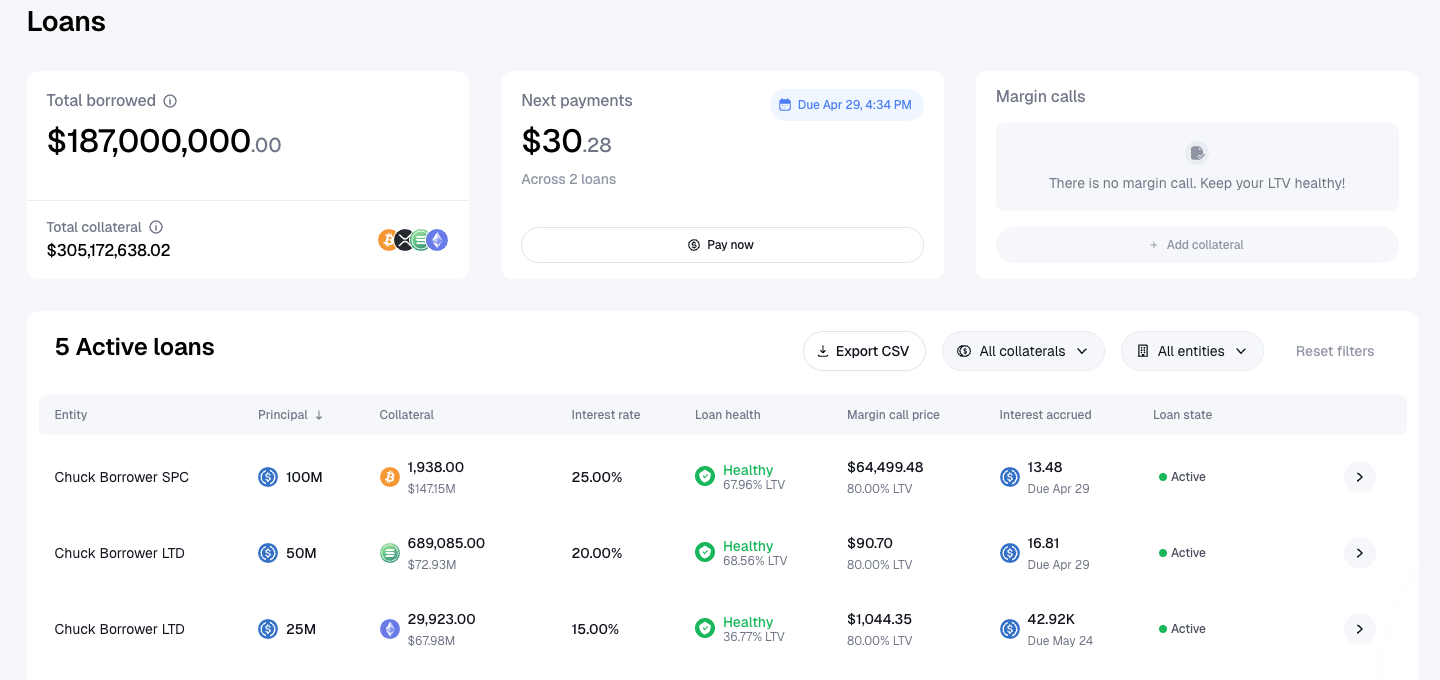
* **Multi-entity portfolio view**: every loan across every Legal Entity in one view.
* **Loan health**: LTV, margin call and liquidation levels, and trigger prices on every loan.
* **Live status**: know at a glance which loans are healthy and which need attention.
* **Self-serve actions**: accept new loans and refinances, pay interest, and pay down principal.
# Account Management
Account Management covers how your team accesses Maple, the roles assigned to each user, and the wallets approved to transact onchain on your loans.
Maple borrower accounts are built around three concepts:
* **Organization**: your top-level Maple account.
* **Legal Entity**: one or more legal entities under your Organization that hold loans, e.g. a fund vehicle, an offshore subsidiary.
* **User**: a member of your team who can log into the Borrower Hub.
A single team can manage multiple borrowing entities under one login, with portfolio-level visibility and loan management per entity.
## Users and roles
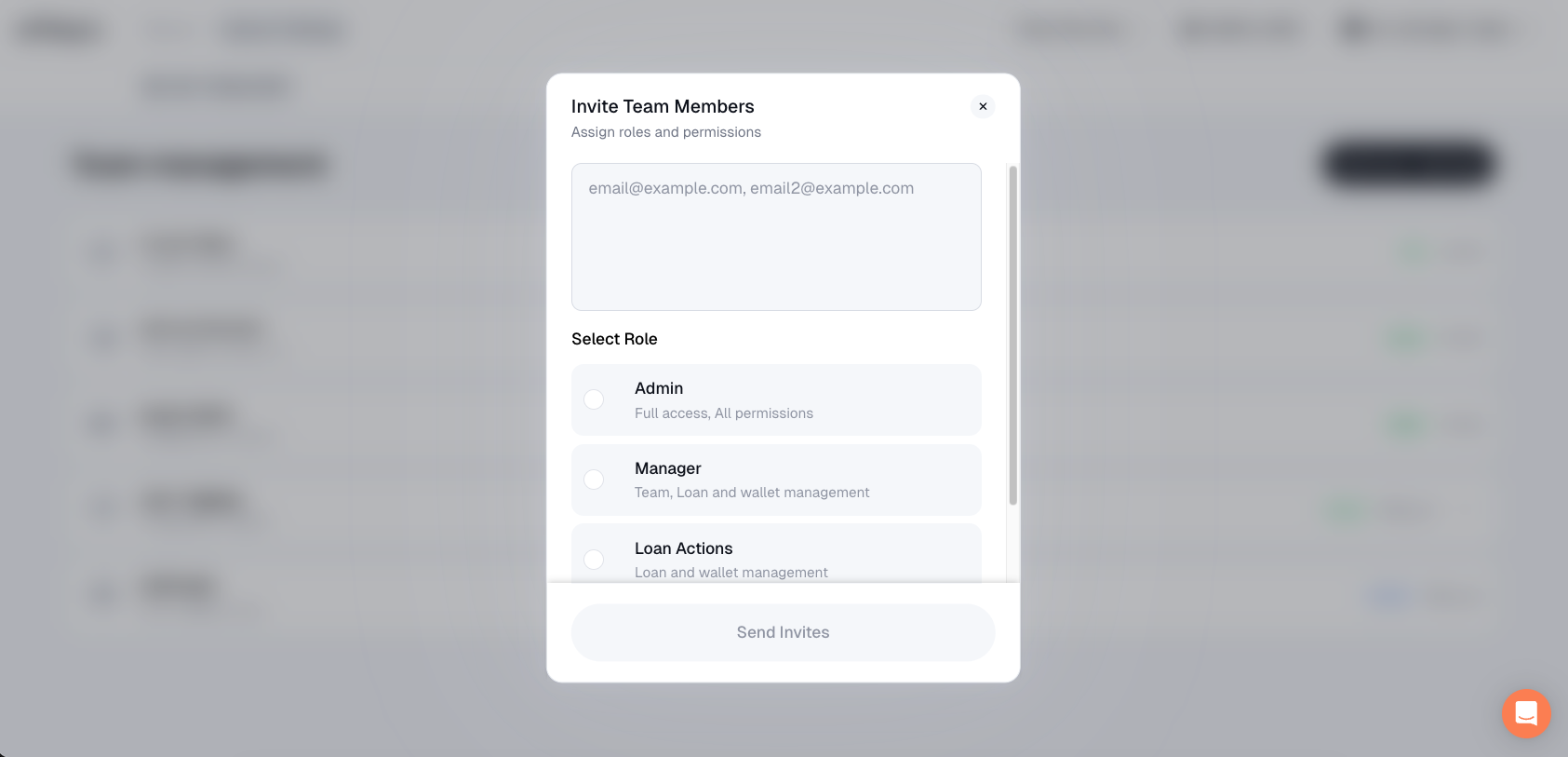
Maple sets up your first Admin during onboarding. From there, Admins and Managers can invite team members and assign or change roles.
<table><thead><tr><th width="147.32464599609375">Role</th><th>Access</th></tr></thead><tbody><tr><td>Admin</td><td>Full access. Manage users and execute all loan actions.</td></tr><tr><td>Manager</td><td>All loan actions plus add and remove non-Admin users.</td></tr><tr><td>Loan Actions</td><td>Execute all loan actions across entities. No user management.</td></tr><tr><td>Viewer</td><td>Read-only. View entities, loans, payments, and wallets.</td></tr></tbody></table>
## Inviting and removing users
Admins and Managers manage users from Account Settings → Team Management:
* **Invite**: enter an email and assign a role. The invitee receives an email to set up their login.
* **Change role**: update a user's role.
* **Remove**: access is revoked immediately.
## Borrower wallets
Loan actions are signed onchain, so taking an action requires:
1. A role with action permissions (Admin, Manager, or Loan Actions).
2. A borrower wallet registered with Maple for the relevant Legal Entity.
Borrower wallets are added by the Maple team during onboarding. To add or remove a wallet, contact Maple. Any wallet can pay interest. Only approved borrower wallets can receive funds, accept a refinance, and repay a loan.
Onchain actions are subject to your wallet's own signing requirements (e.g. multi-sig quorum), independent of Maple's role-based permissioning.
# Loan Management
The Maple Borrower Hub brings every loan across every Legal Entity into one view and lets your team manage them onchain. This page covers the loan statuses you'll see and the actions you can take.
## Loan statuses
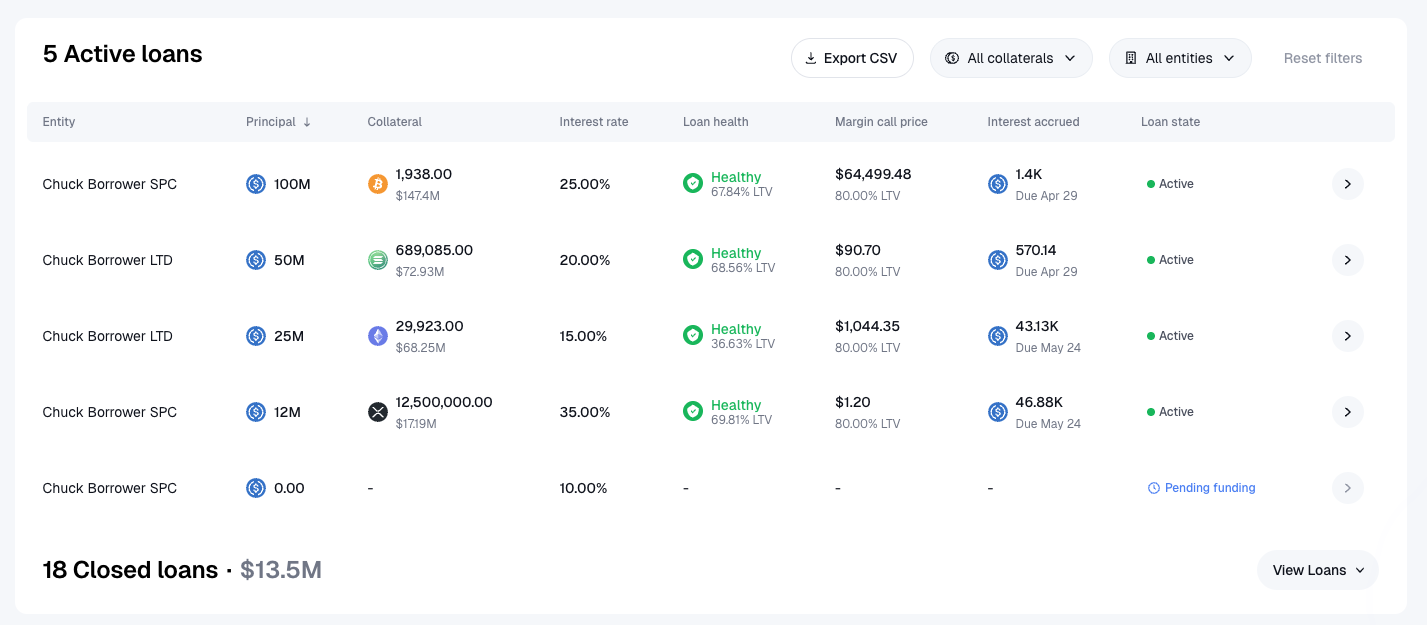
Every loan carries three layers of status:
1. **Loan Health**: collateral value relative to LTV thresholds.
2. **Interest Due**: interest payment timing.
3. **Loan State**: where the loan is in its lifecycle.
### 1. Loan Health
Loan Health is based on your LTV (loan-to-value) relative to the thresholds set in your term sheet.
* `Healthy`: LTV is below the margin call level.
* `Margin Call`: LTV has crossed the margin call level. Action required: top up collateral or pay down principal partially.
* `Liquidation`: LTV has crossed the liquidation level. Maple may liquidate a portion of your collateral to return the loan to a `Healthy` LTV.
Each loan shows the live LTV, the margin call and liquidation levels, and the trigger price for each (e.g. `SOL at $50 = Margin Call`).

### 2. Interest Due
* `Due [date]`: interest payment is due on this date.
* `Due today`: interest payment is due today. The payment is not yet late.
* `Overdue`: interest payment is past due. Late interest is accruing. This state appears in the Interest Accrued column.
### 3. Loan State
Loan States are based on the lifecycle status of the loan:
* `Accept terms`: review and accept the terms of a new loan. The terms in the Hub will match your term sheet.
* `Pending funding`: once terms are accepted, Maple will fund the loan.
* `Active`: all payments are up to date.
* `Repay soon`: principal repayment has been triggered and the loan call period defined in your term sheet has started. The loan principal cannot yet be repaid.
* `Repay now`: the principal repayment is due. The loan principal can now be repaid.
* `Refinance`: a refinance proposal is available on the loan. Refinancing terms can be reviewed from the Refinance tab in the loan details page.
* `Grace Period`: interest payment is past due, but the loan is still within the grace period defined in your term sheet. Late interest is accruing. It usually appears alongside `Overdue`.
* `Defaulted`: missed interest payment after the grace period expires or missed a principal repayment. Late interest is being charged. A defaulted loan can be remediated by paying the interest or the principal outstanding.
**Late interest** is charged as a premium rate above your loan's normal interest rate. It begins accruing as soon as a scheduled payment is missed.
## Loan actions
The Maple Borrower Hub supports 5 key actions. Interest can be paid from any wallet. All others require a wallet registered to the Legal Entity holding the loan, and a user role with action permissions.
### 1. Accept new loan
After you and the Maple team agree to terms offline and sign the term sheet, Maple proposes the loan onchain. The loan appears in the Borrower Hub as `Accept terms` with the proposed terms.
To accept, review the terms in the Borrower Hub and sign. The loan moves to `Pending funding` while Maple funds it, then to `Active` once the payment schedule begins.
### 2. Pay interest
Interest payments follow the schedule in your term sheet. The Borrower Hub shows the next payment, the amount, and the due date for each loan.
Click Pay interest, review the breakdown, and sign. The Borrower Hub calculates the amount owed. If the payment is past due, late interest accrued to date is included in the total.
### 3. Accept refinance
Refinances are initiated by Maple after offline negotiation and a term sheet amendment. The proposed new terms appear in the Maple Borrower Hub with a clear before and after view of what's changing (e.g. interest rate, principal, term length, and fees). Review the changes and sign to accept. The new terms take effect onchain.
Borrowers cannot initiate refinances from the Borrower Hub - reach out to your Maple contact to start the conversation.
### 4. Repay loan
Use Repay loan to repay principal when a loan is called. Partial repayments lower your LTV and can cure a margin call.
### 5. Curing a margin call (coming soon)
When a loan enters `Margin Call`, you have two ways to bring LTV back below the threshold:
1. **Top up collateral**: send additional collateral to your loan's collateral address. Once received, the loan returns to `Healthy`.
2. **Pay down principal**: use Repay loan to reduce principal until LTV is below the margin call level.
Maple will reach out via your usual channels (typically email) when a margin call is triggered. The time you have to cure it is defined in your term sheet.
## Fees
Maple loans carry an origination fee and ongoing service fees, defined in your term sheet. See [Fees](https://docs.maple.finance/technical-resources/protocol-overview/fees) for details.
# Borrower FAQ
#### When does the new Hub go live?
The full Hub with onchain actions becomes the standard for all borrowers on May 21, 2026.
#### Do I need to do anything to migrate?
No. Your organization, legal entities, and existing loans have already been migrated. You will receive a one-time email setup link when the new Hub becomes the standard for your account.
#### How do I log in? Do I still need a wallet?
Login is with your email at <https://app.maple.finance/borrow>. You only need a wallet when you take an onchain action - for example, accept a new loan or make a payment. This means anyone on your team can be added as a user and view your loans, even if they are not DeFi-native.
#### Will the old dashboard still work?
Yes, the old dashboard will still be live until June 30, 2026. After that, it will be retired.
#### Can I add additional users from my team?
Yes, navigate to Account Settings → Team Management from inside the Borrower Hub. You can assign roles per user. If you want us to set users up for you, message us on Telegram or email <support@maple.finance>.
#### What if my organization has multiple legal entities?
All your entities live under one organization view. You can easily see each individual entity's amount borrowed and collateral or view consolidated balances across them.
#### Where do I make payments?
Inside the Borrower Hub, on each loan. Connect a wallet from your account when prompted.
#### Who do I contact if something breaks?
Reply on your existing Telegram channel with us, or email <support@maple.finance>. The old dashboard remains live if you need to take a time-sensitive action.
#### How is my login secured?
Login uses email with an access code or Google OAuth. Two-factor authentication via one-time codes and passkeys is supported, and you must enable it to take actions.
#### Is my email address used for anything beyond login?
Your email is used for account login, transactional notifications (margin call alerts), and security alerts. It is not used for marketing without your explicit consent.
#### What data does Maple hold about my organization?
The same data Maple has always held: your organization name, legal entity structure, the wallets you have used to take loans, and the loans themselves. The new Hub adds email addresses for the users you have added, as well as authentication metadata (login timestamps, IP addresses, and devices).
#### Where is my data stored, and who can access it?
Data is stored on encrypted infrastructure with reputable cloud providers. Internal access at Maple is role-limited. We do not give third parties access to your data outside of legally required disclosures.
#### Have Maple's smart contracts been audited?
The smart contracts have been audited by Sherlock, Spearbit and other leading security firms. Full details here: <https://docs.maple.finance/technical-resources/security/security>
#### Why did you move to email login? Is it less secure than a wallet?
Email login is more accessible - anyone on your team can use it without having access to your wallet. It is not a replacement for wallet-based signing. Onchain actions - accepting new loans, payments, refinances - still require a wallet signature. The wallet remains the source of truth for funds; email is the source of truth for who can view and operate the Borrower Hub.
#### What if my email is compromised?
An attacker with access to your email wouldn't be able to access your account due to the required MFA. If they manage to compromise both and access the account, they could view loan information but cannot move funds - every onchain action requires a wallet signature, which is independent of email login.
#### Does Maple have access to my wallet?
No. Maple never has access to your wallet's private keys. Wallet connection inside the Hub is read-only until you sign a transaction - and only you can sign.
#### What is your incident-response policy if there's a security event?
Telegram and email notifications go out as soon as an incident is identified. The team is reachable 24/7 for institutional borrowers via the existing Telegram channel.
#### How can my information security team review your security posture?
Email <support@maple.finance> with a brief description of the프로젝트로 돌아가기
