bitpro가 원문에서 글자만 모은 내용이에요. 표·그림·수식은 빠지거나 깨질 수 있어요. 전체 13쪽 중 12쪽
scan), or the contract may have already been verified with a full match.
```
# Data Indexing
Getting historical data on a smart contract can be frustrating when you’re building a dapp. [The Graph](https://thegraph.com/) provides a decentralized option to query smart contract data through APIs known as subgraphs, which utilize GraphQL. The Graph’s infrastructure relies on a decentralized network of indexers, enabling your dapp to become truly decentralized.
## Quick Start
These subgraphs only take a few minutes to set up and get running. To get started, follow these three steps:
1. Initialize your subgraph project
2. Deploy & Publish
3. Query from your dapp
Pricing: **All developers receive 100K free queries per month on the decentralized network**. After these free queries, you only pay based on usage at $2 for every 100K queries.
Here’s a step by step walk through:
## 1. Initialize your subgraph project
### Create a subgraph on Subgraph Studio
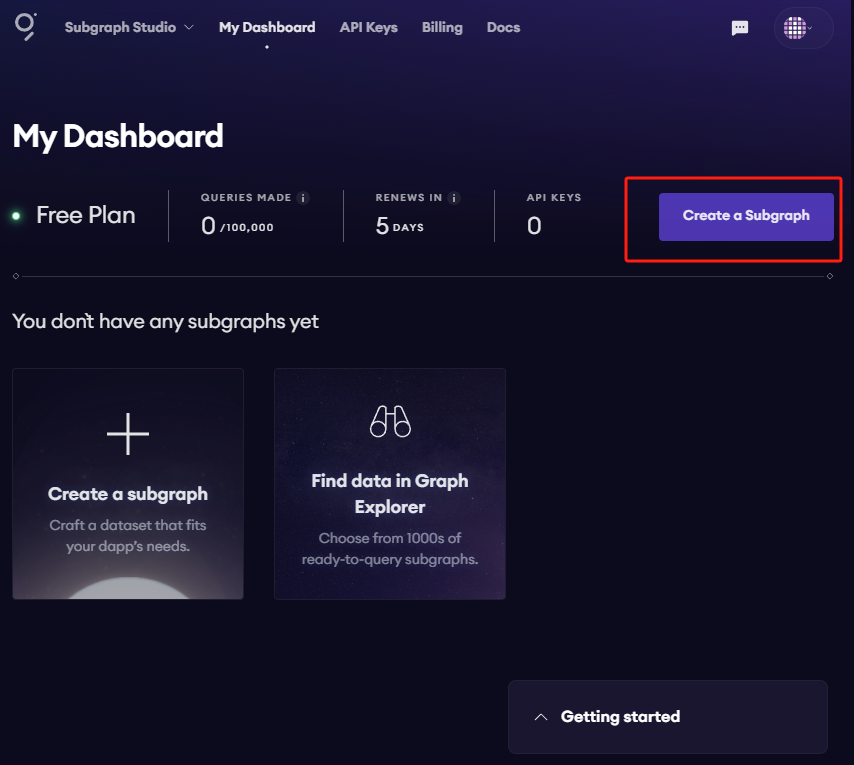
Go to the [Subgraph Studio](https://thegraph.com/studio/) and connect your wallet. Once your wallet is connected, you can begin by clicking “Create a Subgraph”. It is recommended to use Title Case: “Subgraph Name Chain Name.”
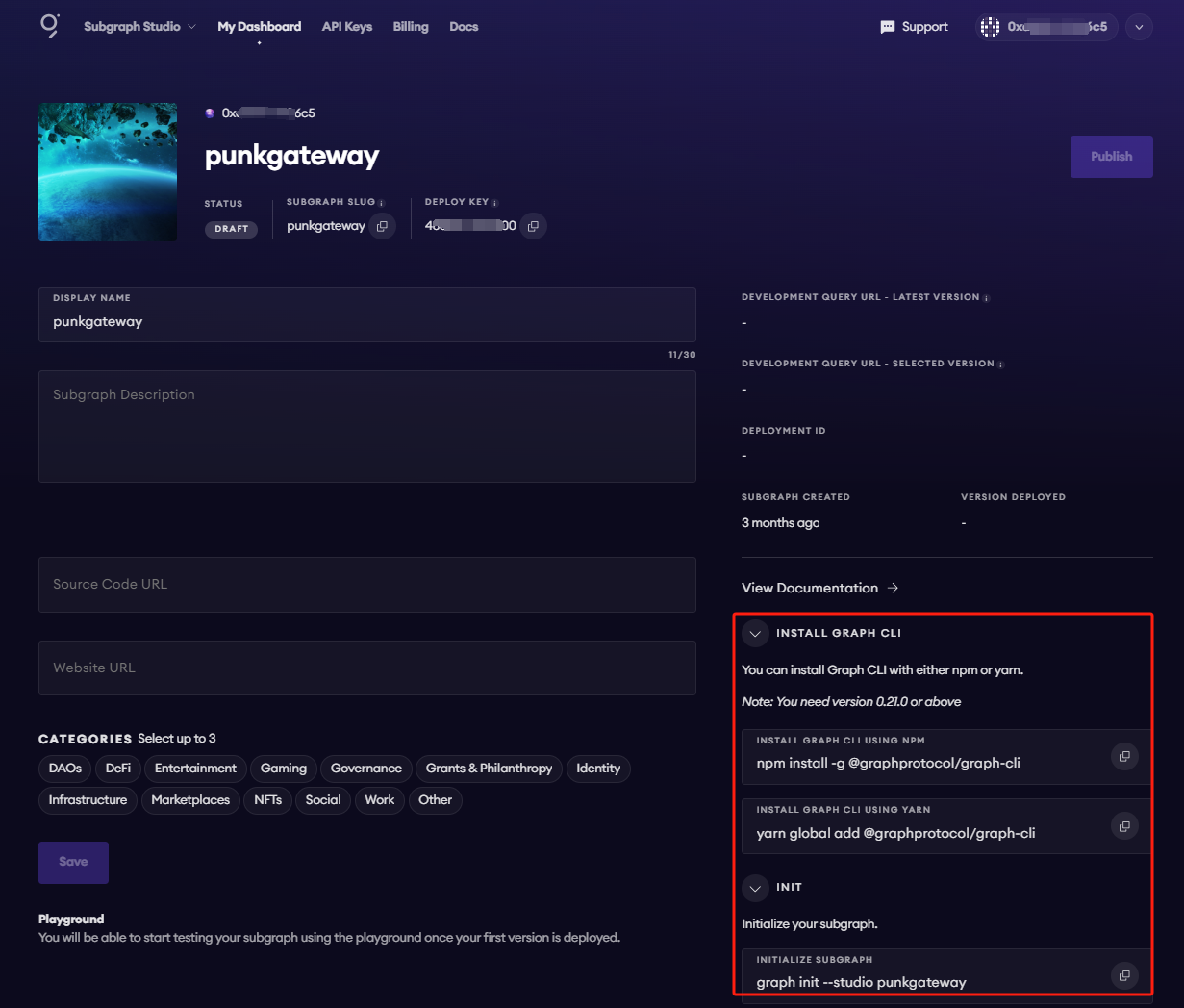
You will then land on your subgraph’s page. All the CLI commands you need will be visible on the right side of the page:
### Install the Graph CLI
On your local machine run the following:
```
npm install -g @graphprotocol/graph-cli
```
### Initialize your Subgraph
You can copy this directly from your subgraph page to include your specific subgraph slug:
```
graph init <SUBGRAPH_SLUG>
```
You’ll be prompted to provide some info on your subgraph like this:
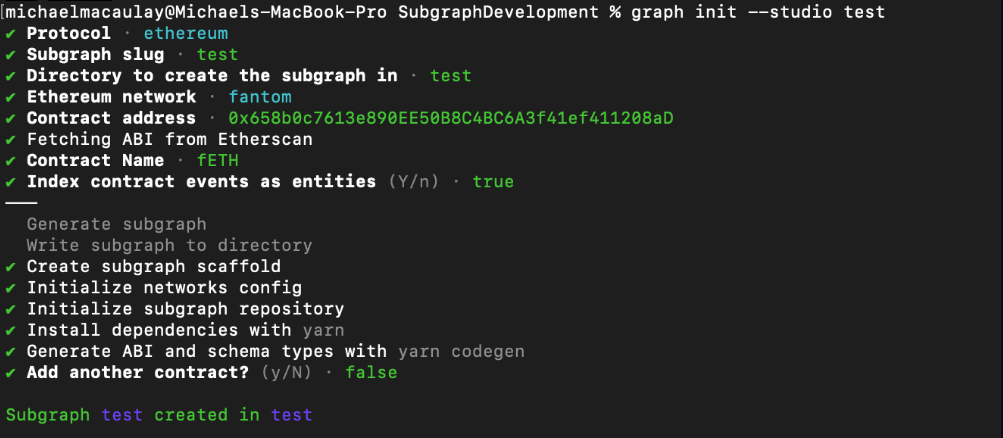
Simply have your contract verified on the block explorer and the CLI will automatically obtain the ABI and set up your subgraph. The default settings will generate an entity for each event.
## 2. Deploy & Publish
### Deploy to Subgraph Studio
First run these commands:
```bash
$ graph codegen
$ graph build
```
Then run these to authenticate and deploy your subgraph. You can copy these commands directly from your subgraph’s page in Studio to include your specific deploy key and subgraph slug:
```bash
$ graph auth <DEPLOY_KEY>
$ graph deploy <SUBGRAPH_SLUG>
```
You will be asked for a version label. You can enter something like v0.0.1, but you’re free to choose the format.
### Test your subgraph
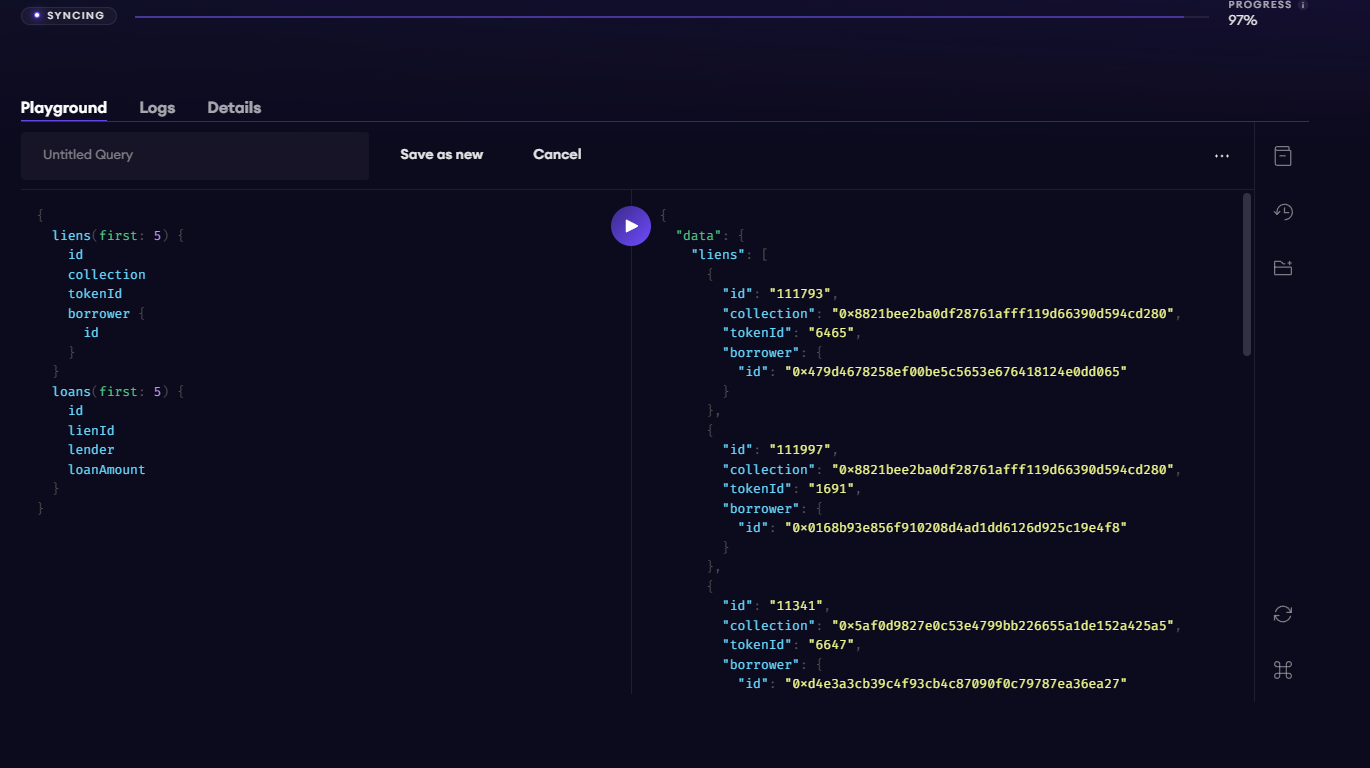
You can test your subgraph by making a sample query in the playground section. The Details tab will show you an API endpoint. You can use that endpoint to test from your dapp.
### Publish Your Subgraph to The Graph’s Decentralized Network
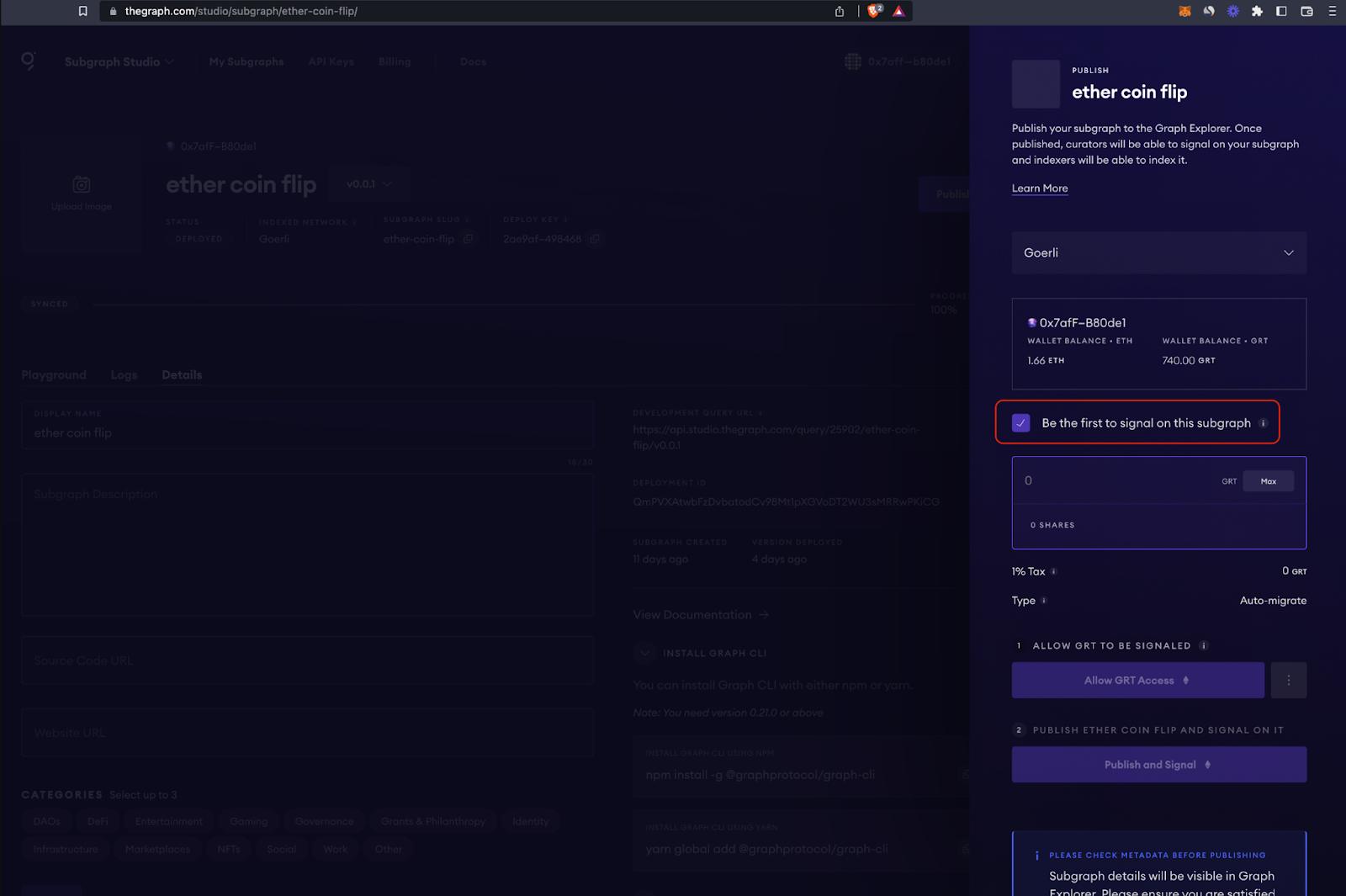
Once your subgraph is ready to be put into production, you can publish it to the decentralized network. On your subgraph’s page in Subgraph Studio, click on the Publish button:

Before you can query your subgraph, Indexers need to begin serving queries on it. In order to streamline this process, you can curate your own subgraph using GRT.
When publishing, you’ll see the option to curate your subgraph. As of May 2024, it is recommended that you curate your own subgraph with at least 3,000 GRT to ensure that it is indexed and available for querying as soon as possible.
## 3. Query your Subgraph
Congratulations! You can now query your subgraph on the decentralized network!
For any subgraph on the decentralized network, you can start querying it by passing a GraphQL query into the subgraph’s query URL which can be found at the top of its Explorer page.
Here’s an example from the [CryptoPunks Ethereum subgraph](https://thegraph.com/explorer/subgraphs/HdVdERFUe8h61vm2fDyycHgxjsde5PbB832NHgJfZNqK) by Messari:
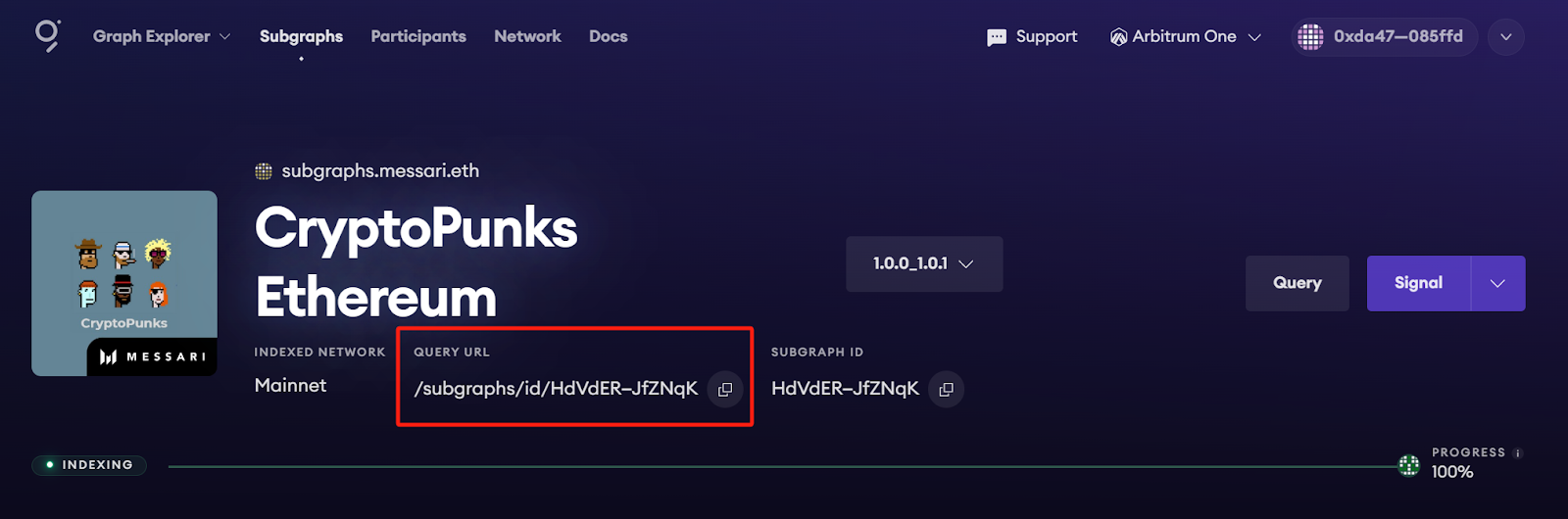
The query URL for this subgraph is:
<https://gateway-arbitrum.network.thegraph.com/api/**\\[api-key]**/subgraphs/id/HdVdERFUe8h61vm2fDyycHgxjsde5PbB832NHgJfZNqK>
Now, you simply need to fill in your own API Key to start sending GraphQL queries to this endpoint.
### Getting your own API Key
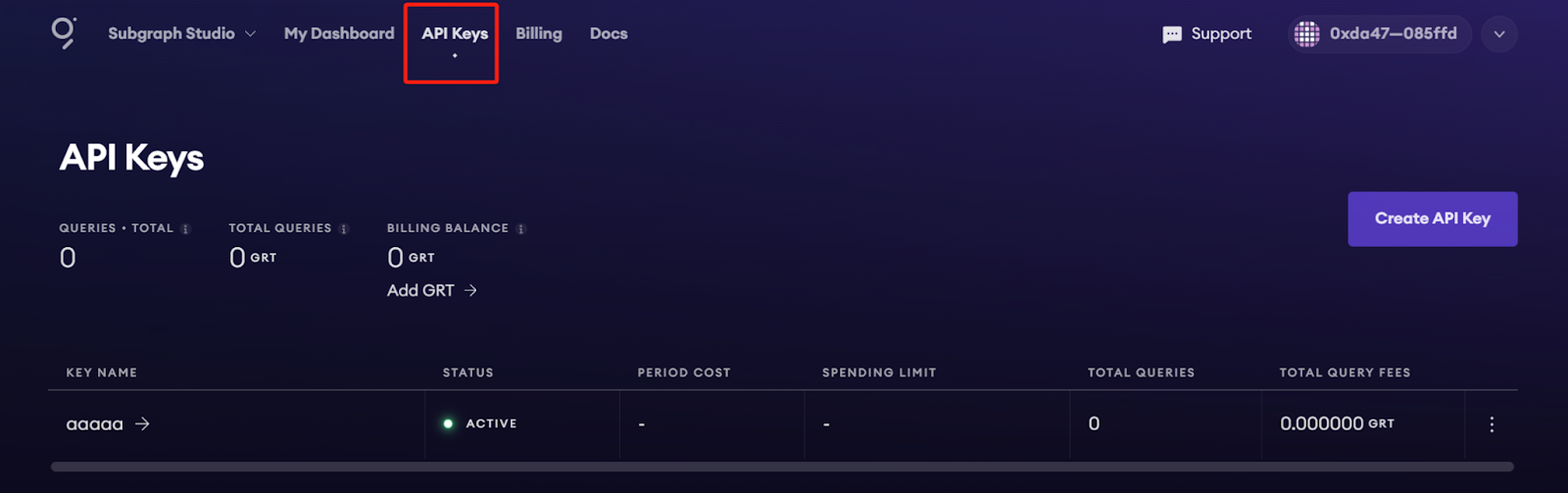
In Subgraph Studio, you’ll see the “API Keys” menu at the top of the page. Here you can create API Keys.
## Appendix
### Sample Query
This query shows the most expensive CryptoPunks sold.
```graphql
{
trades(orderBy: priceETH, orderDirection: desc) {
priceETH
tokenId
}
}
```
Passing this into the query URL returns this result:
```
{
"data": {
"trades": [
{
"priceETH": "124457.067524886018255505",
"tokenId": "9998"
},
{
"priceETH": "8000",
"tokenId": "5822"
},
// ...
```
💡 Trivia: Looking at the top sales on \[CryptoPunks website]\(<https://cryptopunks.app/cryptopunks/topsales>) it looks like the top sale is Punk #5822, not #9998. Why? Because they censor the flash-loan sale that happened.
### Sample code
```jsx
const axios = require('axios');
const graphqlQuery = `{
trades(orderBy: priceETH, orderDirection: desc) {
priceETH
tokenId
}
}`;
const queryUrl = 'https://gateway-arbitrum.network.thegraph.com/api/[api-key]/subgraphs/id/HdVdERFUe8h61vm2fDyycHgxjsde5PbB832NHgJfZNqK'
const graphQLRequest = {
method: 'post',
url: queryUrl,
data: {
query: graphqlQuery,
},
};
// Send the GraphQL query
axios(graphQLRequest)
.then((response) => {
// Handle the response here
const data = response.data.data
console.log(data)
})
.catch((error) => {
// Handle any errors
console.error(error);
});
```
### Additional resources:
* To explore all the ways you can optimize & customize your subgraph for a better performance, read more about [creating a subgraph here](https://thegraph.com/docs/en/developing/creating-a-subgraph/).
* For more information about querying data from your subgraph, read more [here](https://thegraph.com/docs/en/querying/querying-the-graph/).
# Oracles
🌐 Overview
Oracles play a critical role in bridging the gap between blockchain and the external world, enabling smart contracts on Hemi to access trustworthy off-chain data necessary for various use cases. 
The most common applications of oracles include:
* Providing up-to-date token prices for different pairs, which is essential for DeFi protocols and financial products.
* Enabling dynamic NFTs that can change their properties based on real-world events, adding a layer of interactivity and uniqueness.
***
## ⎑ Push vs Pull
Oracles operate using two primary models:
* **Push Model:** In this traditional approach, the oracle regularly pushes data to an on-chain contract, which dApps can access as needed.
* **Pull Model:** This newer model involves oracles signing data and keeping it on an external network. When dApps need updated data, users pull the signed data and submit it on-chain with their transaction.
***
### Pyth <a href="#redstone" id="redstone"></a>
Pyth offers push-based price feeds for Hemi. 
#### **Supported Networks:**
* Hemi Mainnet
* Hemi Sepolia
{% embed url="<https://insights.pyth.network/price-feeds?search=hemi>" %}
***
### Redstone <a href="#redstone" id="redstone"></a>
Redstone offers push-based price feeds for Hemi. 
#### Supported Networks:
* Hemi Mainnet
* Hemi Sepolia
{% embed url="<https://app.redstone.finance/app/feeds/?networks=743111,43111&page=1&sortBy=popularity&sortDesc=false&perPage=32>" %}
***
### Stork <a href="#redstone" id="redstone"></a>
Stork offers pull-based price feeds for Hemi. 
#### Supported Networks:
* Hemi Mainnet
{% embed url="<https://docs.stork.network/resources/contract-addresses/evm#hemi>" %}
***
### eOracle <a href="#redstone" id="redstone"></a>
eOracle offers pull-based price feeds for Hemi. 
#### Supported Networks:
* Hemi Mainnet
{% embed url="<https://docs.eo.app/docs/eprice/feed-addresses/hemi>" %}
# FAQ
## General
<details>
<summary>Where can I learn more about Hemi?</summary>
You can learn more about Hemi by reading our documentation, visiting our website, reading the whitepaper, or joining the community on Discord.
</details>
## Smart Contract Deployments
<details>
<summary><strong>Why is my smart contract deployment failing on the testnet even though the contract seems to be created?</strong></summary>
**🌐 Overview**
* Deployment issues on testnet can stem from using features or opcodes not yet supported by the testnet's version of the EVM.
* Check the `Raw trace` tab
<figure><img src="https://3063395300-files.gitbook.io/~/files/v0/b/gitbook-x-prod.appspot.com/o/spaces%2FBrGAUP9hcnvqWQvHZlN0%2Fuploads%2FC5VzXk8qM2qvOVxFCJVu%2Fimage.png?alt=media&token=a83a9429-24c0-4fcb-8fec-bc3e62a9b2d5" alt=""><figcaption></figcaption></figure>
**👀 Common Culprits**
* <mark style="color:blue;">One frequent cause is the use of the</mark> <mark style="color:blue;">`PUSH0`</mark><mark style="color:blue;">opcode, which was introduced in</mark> <mark style="color:blue;">**EIP-3855**</mark> <mark style="color:blue;">with the</mark> *<mark style="color:blue;">**Shanghai upgrade**</mark>*<mark style="color:blue;">.</mark>
**✅ Solutions**
* To avoid such issues, it's best to wait until testnet officially supports these new features before attempting to deploy contracts that rely on them.
* 📜 We will make an announcement when we update this soon!
</details>
<details>
<summary>Gas Usage (e.g. are you at 100%?)</summary>
**🌐 Overview**
* Deployment failures can often be traced back to insufficient gas allocation.
* When a transaction consumes all allocated gas without completing, the network rejects it to avoid executing transactions that could run indefinitely.
**👀 Common Culprits**
* **100% Gas Consumption:** If a transaction fails and the gas usage is 100%, it suggests the gas limit set for the contract's deployment was too low to cover the computation required.
* Check `Gas usage & limit by txn`
**✅ Solutions**
* **Increase Gas Limit:** Adjust the gas limit upwards based on the complexity of your contract and the estimations provided by gas estimation tools.
* **Optimize Contract Code:** Review and optimize your smart contract code to reduce gas consumption. This can involve simplifying functions, removing unnecessary operations, or leveraging patterns that consume less gas.
* **Test Thoroughly**
</details>
<details>
<summary>Did you verify your Smart Contract?</summary>
**🌐 Overview**
Preparing your smart contract for deployment involves a critical step: <mark style="background-color:green;">verification</mark>. This process not only helps in catching potential issues early but also enhances the contract's integrity before it goes live.
**🔍 Verification is Key**
Verifying your smart contract is paramount to ensure its readiness for deployment. This crucial step provides valuable insights into any potential errors or vulnerabilities that could compromise its performance or security.
**🛠 Steps to Verify:**
* **Navigate to Contract Details:** Access your contract's details within your development environment or via a testnet blockchain explorer where your contract will be deployed.
* Look for the `Verify and Publish` option. **Selecting this begins the verification process, which is essential for assessing whether your contract operates as intended and is ready for interaction with users.**
[Read more](https://docs.blockscout.com/for-users/verifying-a-smart-contract) about verifying smart contracts deployed on Hemi.
</details>
## Navigating the Hemi Portal
<details>
<summary>What tokens are currently supported?</summary>
You can use our platform to access a variety of tokens, including ETH, USDT, USDC, and DAI.
</details>
<details>
<summary>What is tunneling? What is a tunnel?</summary>
The Hemi Tunnel is designed for seamless cross-chain transactions.
Hemi’s Bitcoin and Ethereum Tunnels improve security while decentralizing asset portability. They do this by leveraging the Hemi Virtual Machine, which gives the network direct awareness of Bitcoin’s and Ethereum’s states.
</details>
Have more questions or concerns? See [Support and Bug Reports](/feedback/contact)
# Official Links
Links to everything Hemi.
| Website | <https://hemi.xyz/> |
| ------------- | ---------------------------------------- |
| Whitepaper | <https://static.hemi.xyz/whitepaper.pdf> |
| Blog | <https://hemi.xyz/blog/> |
| Documentation | <https://docs.hemi.xyz/> |
| Store | <https://hemi.store/> |
| Status | <https://hemistatus.com/> |
### Apps
| | |
| ---------------------- | ------------------------------------------------- |
| Hemi Portal | <https://app.hemi.xyz/> |
| Hemi Tunnel | <https://app.hemi.xyz/tunnel/> |
| Hemi Staking | <https://app.hemi.xyz/staking-dashboard/> |
| Mainnet Block Explorer | <https://explorer.hemi.xyz/> |
| Testnet Block Explorer | <https://testnet.explorer.hemi.xyz/> |
| Pure Finance | [https://pure.finance/](https://pure.finance/en/) |
### Social Media
| Discord | <https://discord.gg/hemixyz> |
| ----------- | ----------------------------------------------- |
| Farcaster | <https://warpcast.com/hemi-xyz> |
| GitHub | <https://github.com/hemilabs> |
| LinkedIn | <https://linkedin.com/company/hemi-labs> |
| Luma | <https://luma.com/calendar/cal-tg3QUCo7fvXUnle> |
| X (Twitter) | <https://x.com/hemi_xyz> |
| YouTube | <https://youtube.com/@HemiLabs> |
### Official Domains
{% hint style="danger" %}
Below is a list of our official domains. Any domains not listed here are third-party and **are not operated, owned, or affiliated with Hemi Labs.** **Beware of malicious sites claiming to represent Hemi.**
{% endhint %}
| `hemi.xyz` | Hemi websites and applications |
| ---------------- | ------------------------------ |
| `hemi.network` | API and RPC nodes |
| `hemistatus.com` | Hemi status page |
# Brand Kit
This page features the official Hemi logos, symbols, and colors for media use.
Visit <https://hemi.xyz/brand-kit> to view the full Hemi Brand Kit.
***
## Visual Style Guide
Hemi's Visual Style Guide provides guidelines and a standard for the visual of the Hemi brand. We recommend using this document as a starting point for the Hemi brand.
{% file src="/files/vK621xArZlHkTben9XuC" %}
***
## Token logos
{% file src="/files/XwSAuhL06rjbP3HQXjZM" %}
{% file src="/files/OPOYsRgKcfgAyhSPQpKF" %}
{% file src="/files/2Piu2wApPcf5EMowrKp3" %}
{% file src="/files/fw15j3SFfw0l6V3taNm6" %}
# Support and Bug Reports
How to get help, report bugs, and disclose security vulnerabilities to Hemi.
### Getting Help
| Issue | Where to report |
| ------------------------------------------------- | ------------------------------------------------------------------------------------------------------------------------------------------------------------------------------------- |
| General support | <p><a href="https://discord.gg/hemixyz">Hemi Discord</a> — <code>#support</code> or <code>#create-ticket</code><br>Email <a href="mailto:support@hemi.xyz"><support@hemi.xyz></a></p> |
| Partnership inquiries | Email <partners@hemi.xyz> |
| Bugs in Hemi services (app, explorer, etc.) | [Hemi Discord](https://discord.gg/hemixyz) — `#create-ticket` |
| Bugs or feature requests for open-source software | Open a [GitHub Issue](https://github.com/hemilabs) on the relevant repository |
| Security vulnerabilities | [See below](#security-vulnerabilities) |
### Security Vulnerabilities
If you've found a security vulnerability in Hemi, we want to hear about it.
{% hint style="danger" %}
**Do not** test against production systems, disclose vulnerabilities publicly, or report them in GitHub issues. Doing so puts users at risk, may violate applicable law, and will disqualify you from rewards.\
\
Denial-of-service testing, social engineering, and volumetric attacks are explicitly out of scope and prohibited. **All security research must be conducted in accordance with the policies outlined in our** [**Bugcrowd program**](https://bugcrowd.com/engagements/hemi)**.**
{% endhint %}
#### How to Report
All vulnerability reports **must** be submitted through our official [Vulnerability Disclosure Program on Bugcrowd](https://bugcrowd.com/engagements/hemi). We do not accept vulnerability reports via email, Discord, social media, or any other channel. Reports submitted outside of Bugcrowd will not be reviewed or eligible for rewards.
When reporting, the more information you can provide, the faster we can triage and confirm the vulnerability. Reports with clear reproduction steps and screenshots are highly valued.
#### Bug Bounty Program
Hemi also operates a private Bug Bounty program on Bugcrowd with paid rewards. Researchers who submit high-quality reports through our Vulnerability Disclosure Program may be invited to participate at Hemi's discretion.
#### Responsible Disclosure
Please do not discuss any vulnerabilities outside our Bugcrowd program without express consent from Hemi Labs. Follow our [program disclosure policy](https://bugcrowd.com/engagements/hemi) for full details.
Hemi provides Safe Harbor for security research conducted in good faith under our program policy. See the full Safe Harbor terms on our [Bugcrowd program page](https://bugcrowd.com/engagements/hemi).
{% hint style="info" %}
For other security-related questions or concerns, please contact <security@hemi.xyz>.
{% endhint %}
#### Out-of-Scope Notes
Some behaviour that looks like a finding is intentional. The items below are documented here so researchers do not spend time on known non-issues.
<details>
<summary><code>txpool_*</code> JSON-RPC methods on <code>op-geth</code> are intentionally exposed</summary>
The `txpool_*` RPC namespace is intentionally exposed on our op-geth nodes and is out of scope for information-disclosure vulnerabilities.
**Why these methods are exposed:**
* They are read-only. They report on transactions that are pending or queued in the node's transaction pool. They do not modify state, move funds, sign anything, or control the node.
* The data they return is already public. Pending and queued transactions are gossiped across the public P2P network, so any connected peer observes the same trans프로젝트로 돌아가기
