bitpro가 원문에서 글자만 모은 내용이에요. 표·그림·수식은 빠지거나 깨질 수 있어요. 전체 13쪽 중 9쪽
vin6LtrE3DkjbKk7oOR3D9fpnCyQmaBvfqxXEV_VnxYCjdefI)
3. Confirm in the wallet and complete the transfer.
\
**How to Renew AWNS**
1. In the asset details page, click the top left corner of the avatar, then click "\[Extend]."

2. Choose the renewal period, click "\[Extend]."

3. Confirm the renewal details, click "\[Open Wallet]"

4.  Confirm and complete the renewal in the wallet, 
**How to Receive Assets**
#### 1. Go to the asset details page.
2\. Find the asset receiving address, click the "Receive" page to get the QR code, or directly copy the receiving address below the avatar.\

3\. Find the corresponding asset from the wallet, paste the receiving address, or scan the QR code to send the asset.
\
**How to Send Assets**
1\. Go to the asset details page, click "Send," and select the type of asset to send from the dropdown list.\

2\. For example, to send USDT, select "Fungible token," enter the recipient's ETH address or AWNS name on the right pop-up box, and click "Send."\

3\. For example, to send NFT, select "NFT," enter the recipient's ETH address or AWNS name on the left pop-up box, and click "Send."

\
**How to Get Referral Rewards**
1. Invite friends to register AWNS.
2. Invited friends enter your AWNS as a referrer when completing their AWNS registration
3. Only then will you receive referral rewards.\

####  How to Claim Referral Rewards
1.Click "\[Referral rewards]" on the navigation bar.
2.Select the AWNS eligible for rewards.
3.Click "\[Claim]" to receive referral rewards.\

**How to Reclaim AWNS**\
\
If an AWNS’ ownership is transferred through a transaction, e.g. through a sale on Opensea, the buyer will have to “reclaim” the rights to use the domain to perform actions like set domain as main address.\

\
**What happens to assets after AWNS expires?**
Make sure to renew or transfer your AWNS before they expire including the assets owned by the AWNS. If your AWNS expires, and consequently registered by someone else, your AWNS assets will be lost.
# Overview of Social & DAOs
Social and DAOs is an **all-in-one social infrastructure platform** that allows users to participate in DAO creation, token creation and decentralized governance within a single dashboard. It enables DAO managers to create and manage DAOs based on preset or customized templates, set token properties for their DAOs and initiate community votes using the cross-chain governance feature.
{% hint style="info" %}
**Risk Disclaimer:** Please note that Clique v1 is not formally audited. All projects built on it may be vulnerable to bugs or exploits. Clique V1 runs entirely on public smart contracts; all consequences from interacting with networks running the protocol are borne by the entities who sign each transaction.
The information provided on this website does not constitute investment advice, financial advice, trading advice, or any other sort of advice and you should not treat any of the website's content as such. STP does not recommend that any token should be bought, sold, or held by you. Do conduct your own due diligence and consult your financial advisor before making any investment decisions.
{% endhint %}
[**Clique DAOs**](https://www.myclique.io/daos) **serves as an all-in-one dashboard for a range of DAO activity.**
<figure><img src="https://content.gitbook.com/content/KPzJzyJFmAFMJBOSKIiV/blobs/z0rOumsyIrXgqT7dHnCO/daos.png" alt=""><figcaption></figcaption></figure>
**DAO Participation:** Clique allows DAO members to browse, govern and socially participate in their projects through this aggregated dashboard. Community members can view treasury, proposals, and ongoing activities through their dashboard. Clique empowers users to easily participate in multiple DAOs where they have membership. At any time, users are able to:
* Participate in activities for open DAO projects
* Manage DAO community memberships
* View holders and governance structure within DAOs
* Vote on open proposals, and view results of closed proposals 
**DAO Creation:** Tools and infrastructure for projects to build DAOs using Verse. All aspects of DAO creation can be executed on Verse 
* Issue new tokens, or bridge existing tokens (cross-chain)
* Implement custom token distribution schedule with reserved token allocation and vesting
* Customize and execute whitelist and public sale
* Optimize DAO parameters for DAO use case, including: Membership DAO, Project DAO, or Investment DAO 
**DAO Governance and Management:** Clique provides efficient decentralized decision-making for communities. DAOs can configure onchain governance parameters including:
* Token holding requirements for voting and proposal creation
* Community voting customization including voting duration and minimum total votes
**DAO Workspace:** Clique provides Web3 community workspace for all builders with no code and gas required.
* **Setup your team framework:** Unleash core members and reward their contribution based on a customized framework.
* **Legitimize your governance participation:** Encourage community engagement through incentives and social credibility.
* **Manage and execute your tasks:** Enhance teamwork and productivity with Web3-centric tools that turn idea into execution.
<figure><img src="https://content.gitbook.com/content/KPzJzyJFmAFMJBOSKIiV/blobs/3QkzexqaNBzKScQf5I7h/dappstore.png" alt=""><figcaption></figcaption></figure>
**DAO Tooling Aggregator:** Scale your DAO with unlimited ecosystem tools and infrastructures. Become part of our ecosystem by integrating your dApp with Clique.
**DAO Rewards:** DAO rewards is a customizable activity feature that allows DAOs to reward community members and contributors. DAO admins can set up a reward pool for users who have completed certain tasks (e.g. interact with DApp, submit bugs and suggestions, become an active member in social channels, complete a quiz, etc). DAO rewards is a great way for DAOs to expand the community and promote community engagements.
**SDK:** Projects can now customize the cross-chain governance and voting system on their own website while saving the development and audit resources of building from scratch. The Clique SDK allows projects to set up their own governance system based on the Clique core features. It also enables the projects to build up their own user flow.
# Cross-chain Governance
Cross-chain governance enables cross-chain voting and proposal creation for DAOs (tokens) on Ethereum through Clique. Clique will support cross-chain governance for Ethereum based projects and DAOs on the Polygon network.
The Cross-chain governance solution comes without the need for projects to issue new tokens or bridge existing tokens to the Polygon. The low gas fees are an advantage for DAOs implementing on-chain governance. Gas fees on Polygon are dramatically reduced compared to Ethereum for all governance activities, including voting and proposal creation.
**Architecture of Cross-chain Governance on Polygon**

On the Polygon, the governance contract allows users to create and vote on proposals. The voting power of a user is determined by the snapshot of their token holdings at the time a proposal is created.
The **Data Bridge** serves as a cross-chain synchronizer to communicate data and voting results between the DAO’s original chain (Ethereum) and Polygon chain. The data bridge caches historical data and snapshots from Ethereum as a certificate in order to deliver user signatures on Polygon. The certificate includes the corresponding token holdings of each user. Users can create and vote on proposals using their signature, with each unique signature being validated by the contract.
# DAO Rewards
As a part of Clique’s V2 upgrade, **Clique Rewards** is a new feature to reward community members and foster engagement by completing certain tasks such as submitting bugs, social activities or quizzes. To encourage active participation, we invite our partners, DAOs and projects to join us in creating a Rewards Campaign. 
The campaign is only available to DAOs or projects that are listed on Clique. To get instruction on how to list your project: <https://stp-dao.gitbook.io/verse-network/clique/how-to-list-your-project-on-clique> 
Once you are listed, contact us to get started with the Rewards Campaign. All you need is tasks and budget for the campaign and Clique will take care of the rest.
\
\
DAO admin can also create the campaign within the DAO homepage – DAO Rewards section.
<figure><img src="https://content.gitbook.com/content/KPzJzyJFmAFMJBOSKIiV/blobs/d14uQjI25F2mg73TnoI4/%E6%88%AA%E5%B1%8F2022-10-20%20%E4%B8%8A%E5%8D%889.52.00.png" alt=""><figcaption></figcaption></figure>
Enter the name and description:
<figure><img src="https://content.gitbook.com/content/KPzJzyJFmAFMJBOSKIiV/blobs/m2rgVc25mTug3UwQMmxt/%E6%88%AA%E5%B1%8F2022-10-20%20%E4%B8%8A%E5%8D%8810.03.15.png" alt=""><figcaption></figcaption></figure>
Setup the information you would like to collect from the user such as twitter, telegram, etc. Then enter the reward token address, network and the amount of the total reward you would like to pay out. Setup event start and end time; and reward claiming start and end time; normally there will be period to prepare the award list between the end of event and the start of reward claiming.
<figure><img src="https://content.gitbook.com/content/KPzJzyJFmAFMJBOSKIiV/blobs/QJph7gYNpUeXUt6KAfAH/image.png" alt=""><figcaption></figcaption></figure>
During the event, the admin can click 'Manage' to download the sheet including the information you collect from the users.
Once the event ends, the admin can upload the reward list in a format of \[user's address, the amount of reward token] in CSV file. You can download the template of the CSV file to make sure the doc format is correct.
Once the reward claiming period ends, the admin can claim back the remaining token.
<figure><img src="https://content.gitbook.com/content/KPzJzyJFmAFMJBOSKIiV/blobs/GlOFfI96XTkzxY1M3hpb/image%20(2).png" alt=""><figcaption></figcaption></figure>
<figure><img src="https://content.gitbook.com/content/KPzJzyJFmAFMJBOSKIiV/blobs/kES2B2lii2DfeYUCyEfV/image%20(1).png" alt=""><figcaption></figcaption></figure>
# Governance SDK (Beta)
Projects can now customize the cross-chain governance and voting system on their own website while saving the development and audit resources of building from scratch. The Clique SDK allows projects to set up their own governance system based on the Clique core features. It also enables the projects to build up their own user flow.
The SDK first comes with the DAO creation and cross-chain governance between ETH and Polygon. More features such as token management and DAO activity will come soon.
**Clique SDK (Beta):** <https://www.npmjs.com/package/@myclique/governance-sdk>
# Social GPT (Beta)
The Clique GPT (AI) is an integration of ChatGPT that optimize the user experience of Clique platform.
**Customer Support:** Clique GPT can answer any questions to users about STP and Clique.
**Content optimization:** Clique GPT can help users to translate and edit their articles, proposals or any contents.
**Idea generalization:** Clique GPT can provide users ideas and suggestions to optimize their DAOs.
<figure><img src="https://content.gitbook.com/content/KPzJzyJFmAFMJBOSKIiV/blobs/NdLlZhN5W0IeMdSLgsGA/%E6%88%AA%E5%B1%8F2023-05-16%2021.42.06.png" alt=""><figcaption></figcaption></figure>
# Tutorials and Resources
# Connect your Wallet
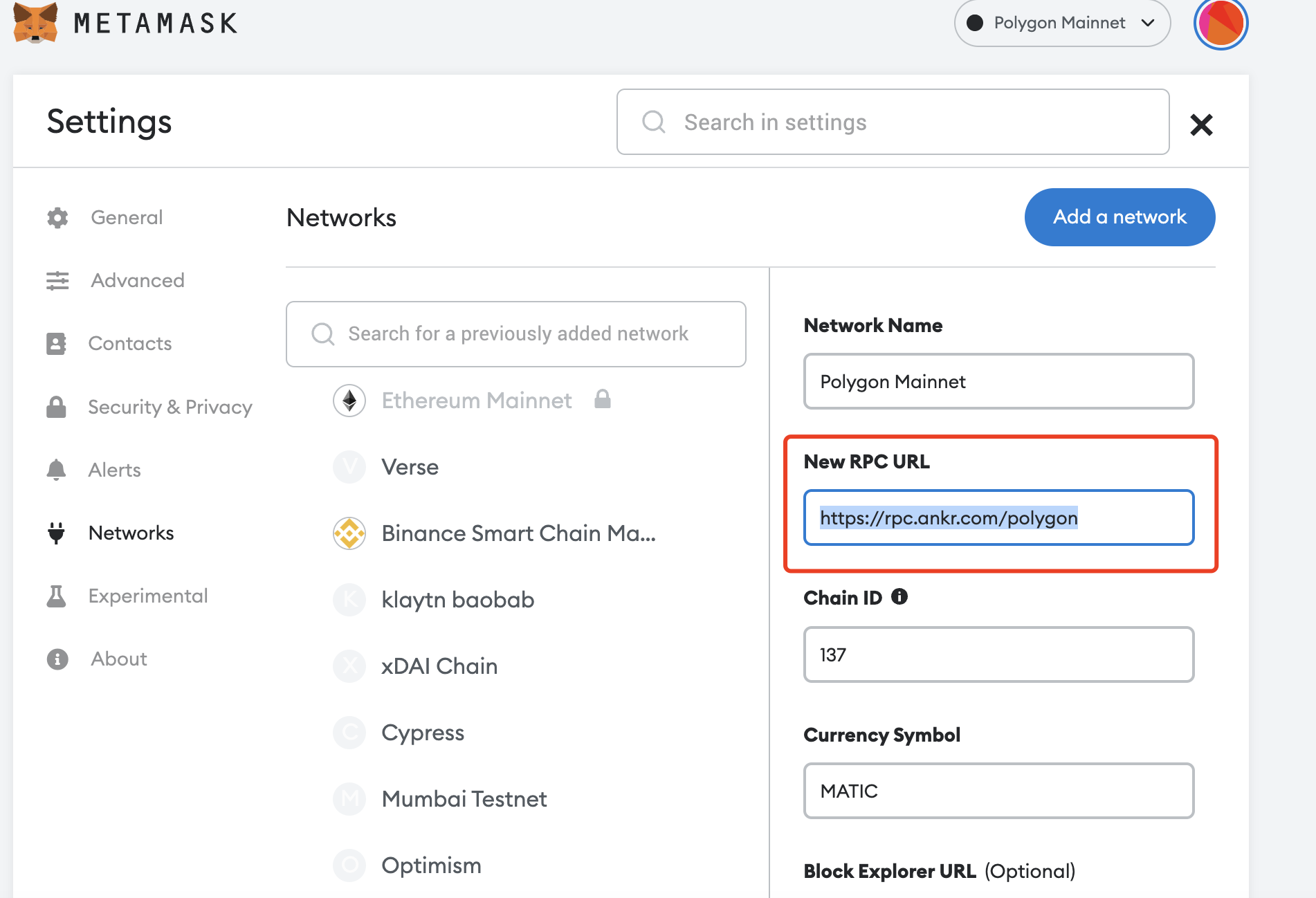
To use Clique, you will need to connect to **Polygon network**. Click '**Connect wallet**' on the top right corner and choose your wallet. You will be automatically connected to **Polygon network**.
{% hint style="info" %}
We recommend users to use Polygon official RPC. If you are experiencing contract execution error or RPC unstability, please try the substitute Polygon RPC provided by Ankr.
{% endhint %}
To connect to substitute RPC, you can simply open the Network Setting of your wallet and replace the previous RPC url with <https://rpc.ankr.com/polygon> .
# How to list your project on Clique
**Step 1:** Go to [Clique](https://myclique.io) and connect your Metamask wallet to Polygon network. Then click the 'Add DAO' button on the left bar or 'Creator' on the top bar. 
<figure><img src="https://content.gitbook.com/content/KPzJzyJFmAFMJBOSKIiV/blobs/Bx7Ecni7gKHvp16uPvA3/image.png" alt=""><figcaption></figcaption></figure>
**Step 2:** Select 'Add DAO'. Then enter the token contract address, DAO name, Logo and other basic information.
<figure><img src="https://content.gitbook.com/content/KPzJzyJFmAFMJBOSKIiV/blobs/OsElbA3SVl1hZvKG6R8a/image.png" alt=""><figcaption></figcaption></figure>
**Step 3:** Enter the governance configurations.
<figure><img src="https://content.gitbook.com/content/KPzJzyJFmAFMJBOSKIiV/blobs/bylmHxVnE92JDEk1Ox6C/image.png" alt=""><figcaption></figcaption></figure>
**Minimum holding to vote -** the minimum amount of token you should hold to participate in a vote.
**Minimum holding to create proposal** - the minimum amount of token you should hold to create a proposal.
**Minimum total votes** - the minimum votes needed to make the voting result valid.
**Default voting period** - the default voting duration for proposals.
**Voting types** - Single choice vote or multiple choice vote.
**Step 4:** Confirm all the information and launch the DAO.
**Administrator:**
Once you have listed your DAO. The creator will become the **super admin** by default. The super admin can edit the basic DAO settings (e.g. DAO profile, description, social media link, etc.), create DAO activities and manage other admins. The role of super admin can be handover to other members.
Admins can be added or removed by the super admin. Admins, usually the core members of the DAO, can edit basic DAO settings (e.g. DAO profile, description, social media link, etc.) and create DAO activities. 
The role of admins can improve the efficiency of DAO management and the credibility of DAO activities. 
# How to use the Workspace
Clique provides Web3 community workspace for all builders with no code and gas required. DAO admins can **setup team framework and manage and exectue tasks** with the workspace dashboard.
<figure><img src="https://content.gitbook.com/content/KPzJzyJFmAFMJBOSKIiV/blobs/XjdxJPJ41IqgAIfah8qn/workspace.png" alt=""><figcaption></figcaption></figure>
DAO admins can create a task, assign to a DAO member, drag it to different status and setup a deadline. 
<figure><img src="https://content.gitbook.com/content/KPzJzyJFmAFMJBOSKIiV/blobs/GF3qO6tCsNVIhICxVHaT/task%20detail.png" alt=""><figcaption></figcaption></figure>
DAO admins can also invite more team members to the workspace.
<figure><img src="https://content.gitbook.com/content/KPzJzyJFmAFMJBOSKIiV/blobs/Di3gimfFHerw9qVMqI3R/invite.png" alt=""><figcaption></figcaption></figure>
With the task dashboard, DAO admins are able to create a to-do list, roadmap and team framework, while adding more transparency their DAO management process. 
# DApp store
Clique DApp store is a **DAO tooling aggregator that includes** unlimited ecosystem tools and infrastructures to boost your DAOs. 
Initial DApp includes token creation, DAO reward, and SDK. More DApps will be available in the near future.
<figure><img src="https://content.gitbook.com/content/KPzJzyJFmAFMJBOSKIiV/blobs/blTXBWDxSXW7va2f1R3k/dappstore.png" alt=""><figcaption></figcaption></figure>
# How to create a Proposal
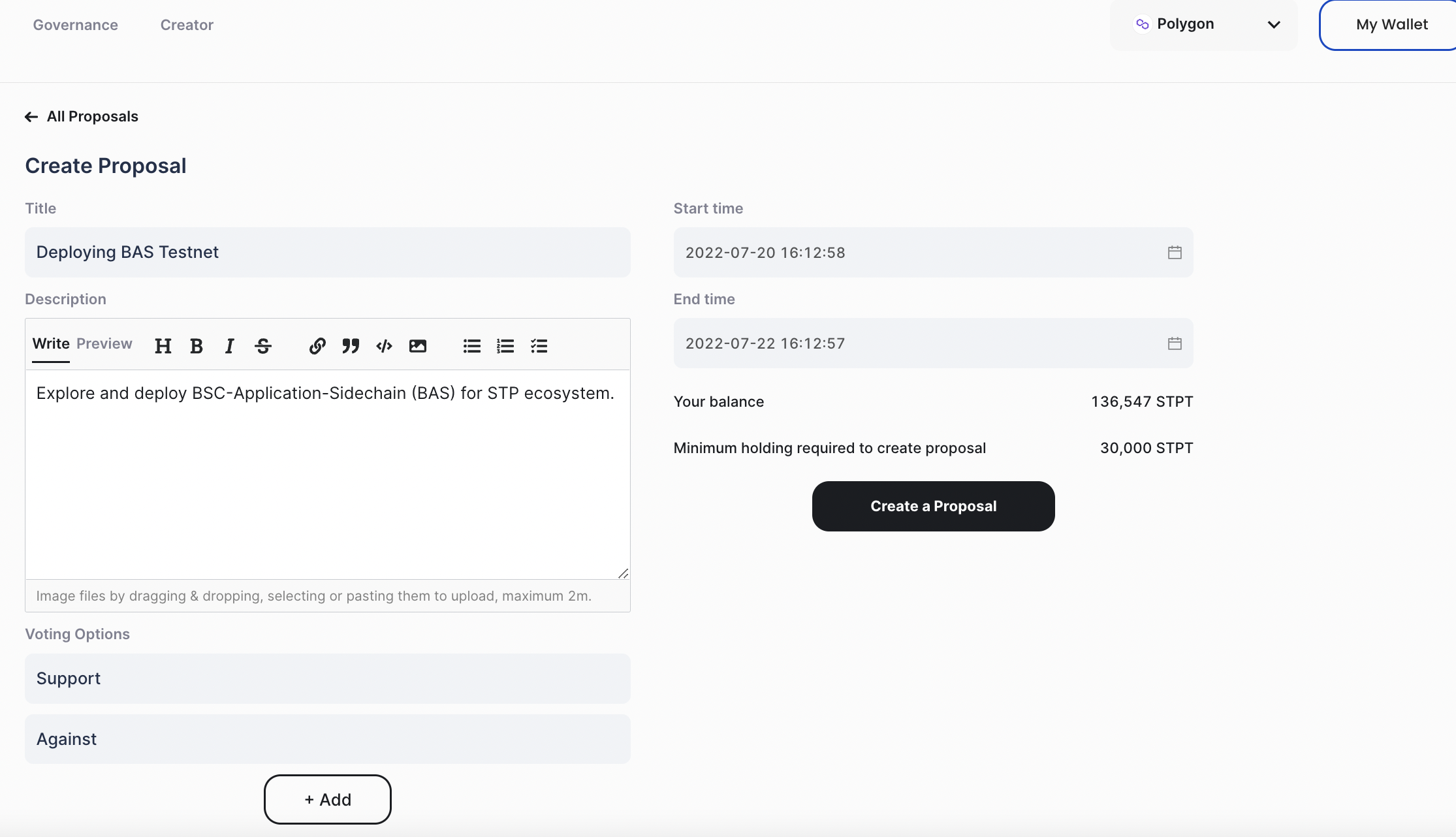
Enter in a DAO and click ‘Create a Proposal’ to start a community proposal. Community proposals, or regular proposals, are a great way to verify your idea and gather thoughts from the community and are manually executed off-chain, such as changing the roadmap, modifying articles, rebranding, etc.
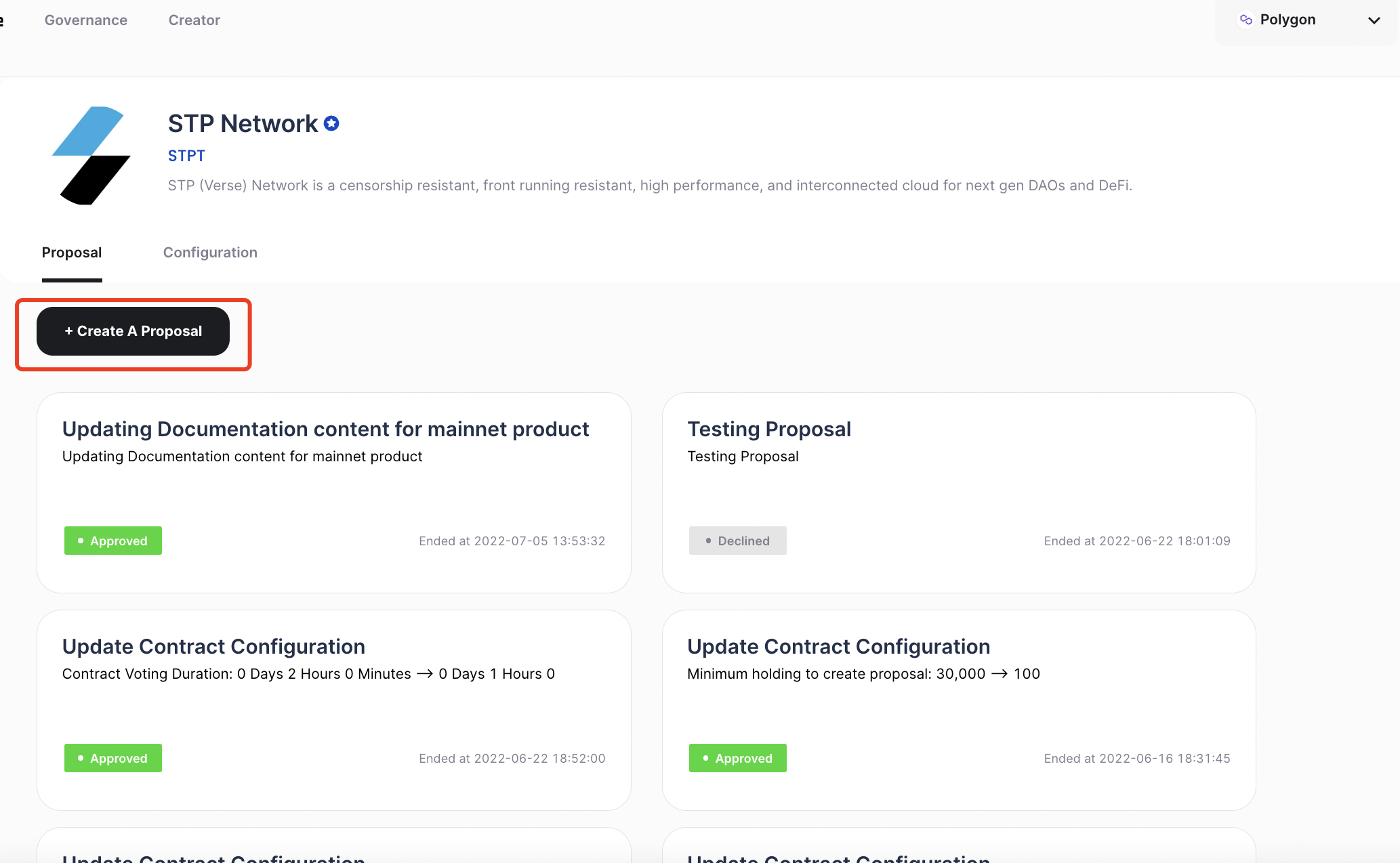
In Community proposals, creators can set multiple customized voting options. To create the proposal, the creator needs to hold the required amount of DAO token which is determined by the DAO configuration. Once created, the proposal will be displayed on the DAO homepage as active.
**How to generate an Executable Proposal**
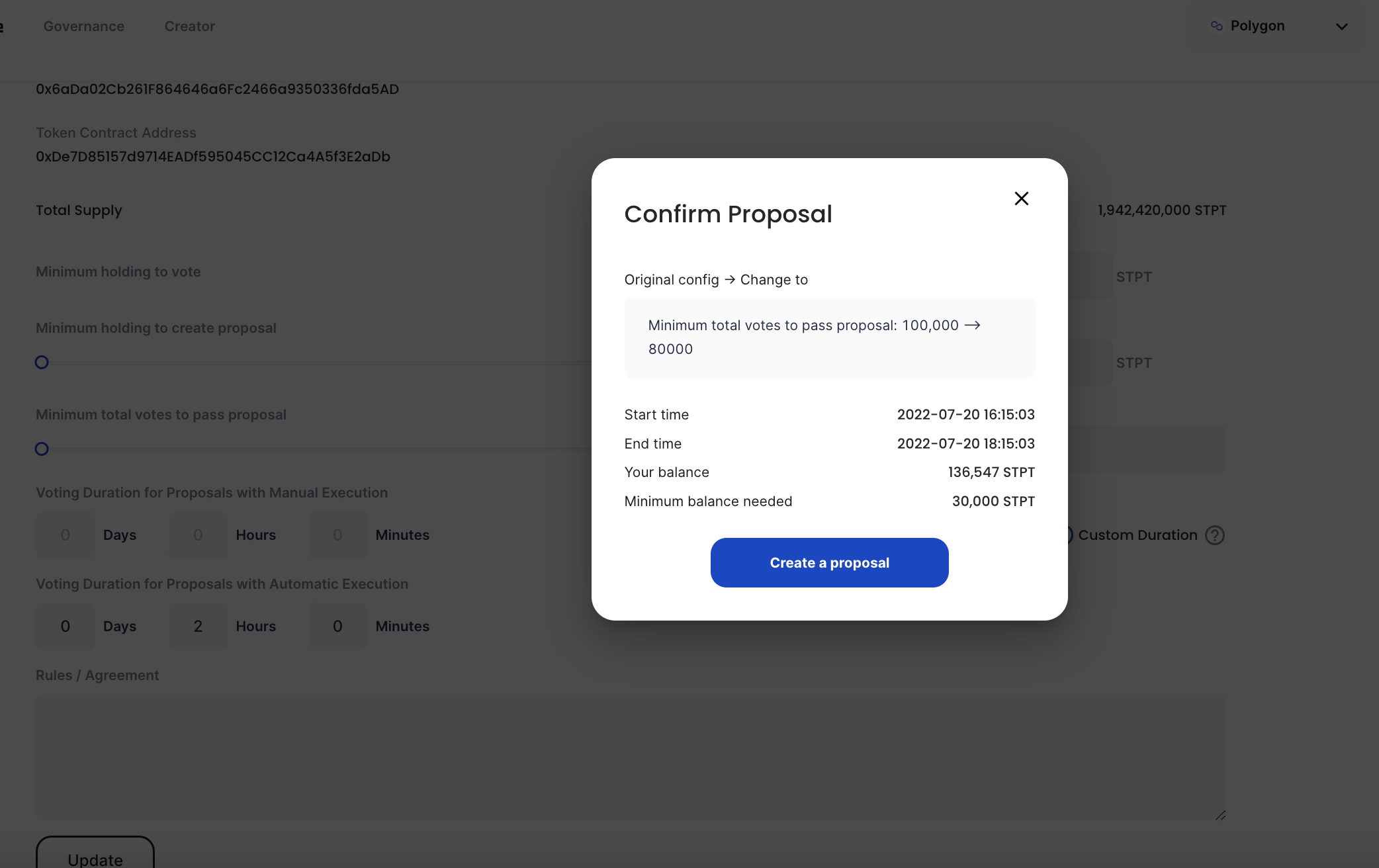
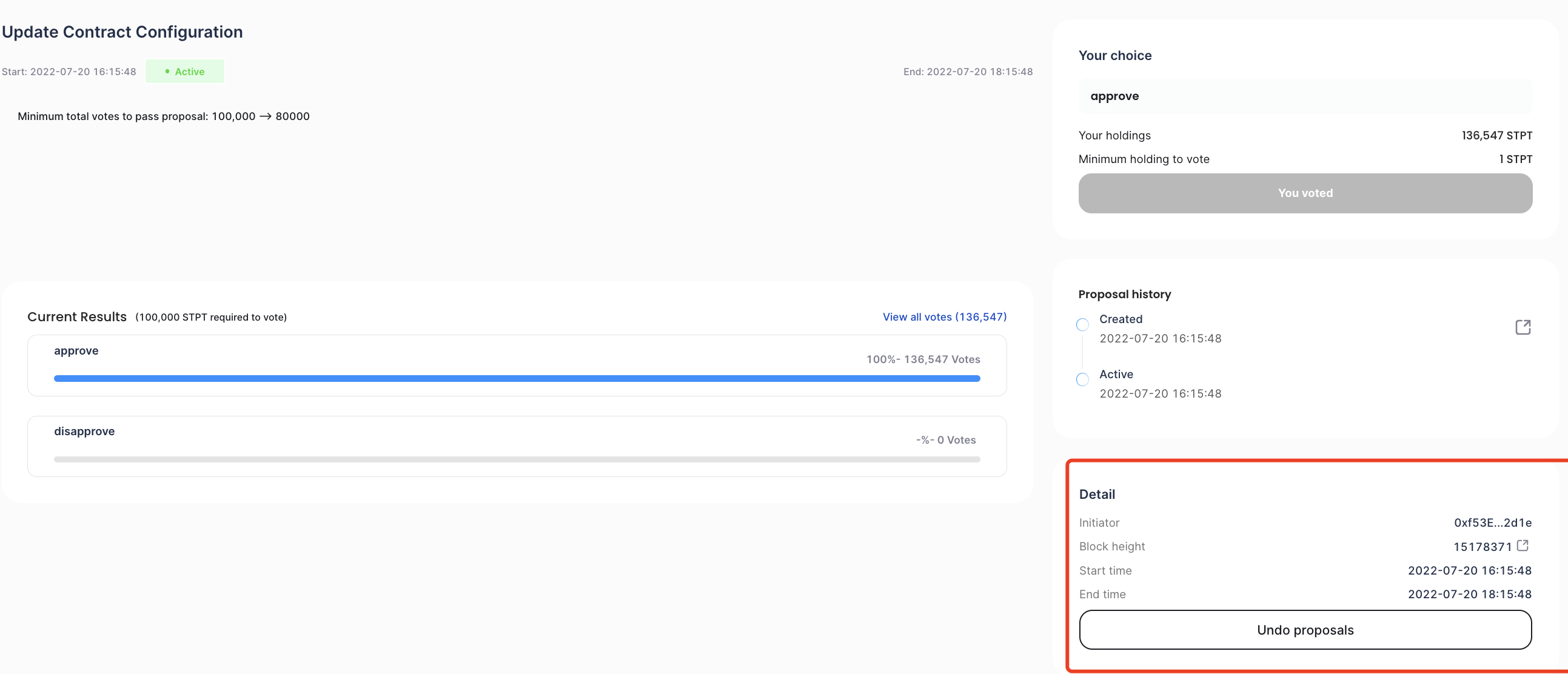
Once you are trying to change the DAO configuration, the DAO contract will automatically generate an executable proposal for community voting. Executable proposals only include binary votes (approve or disapprove) and will be executed by the DAO contract on-chain once it is passed.
Below is an example of changing the DAO configurations. Once you click **Update**, the system will scan your token holding and create this proposal. Once it is passed, the DAO configurations will be changed as your modification.
#### How to withdraw your proposal
You can withdraw your proposal anytime within in the voting period by clicking 'Undo Proposal' and confirming in your wallet.
# How to participate in a vote
**How to Participate in a vote**
Enter any of the proposals from the DAO homepage and select your option to vote. Your voting power is determined by the snapshot of your DAO token holding by the time the proposal was created.
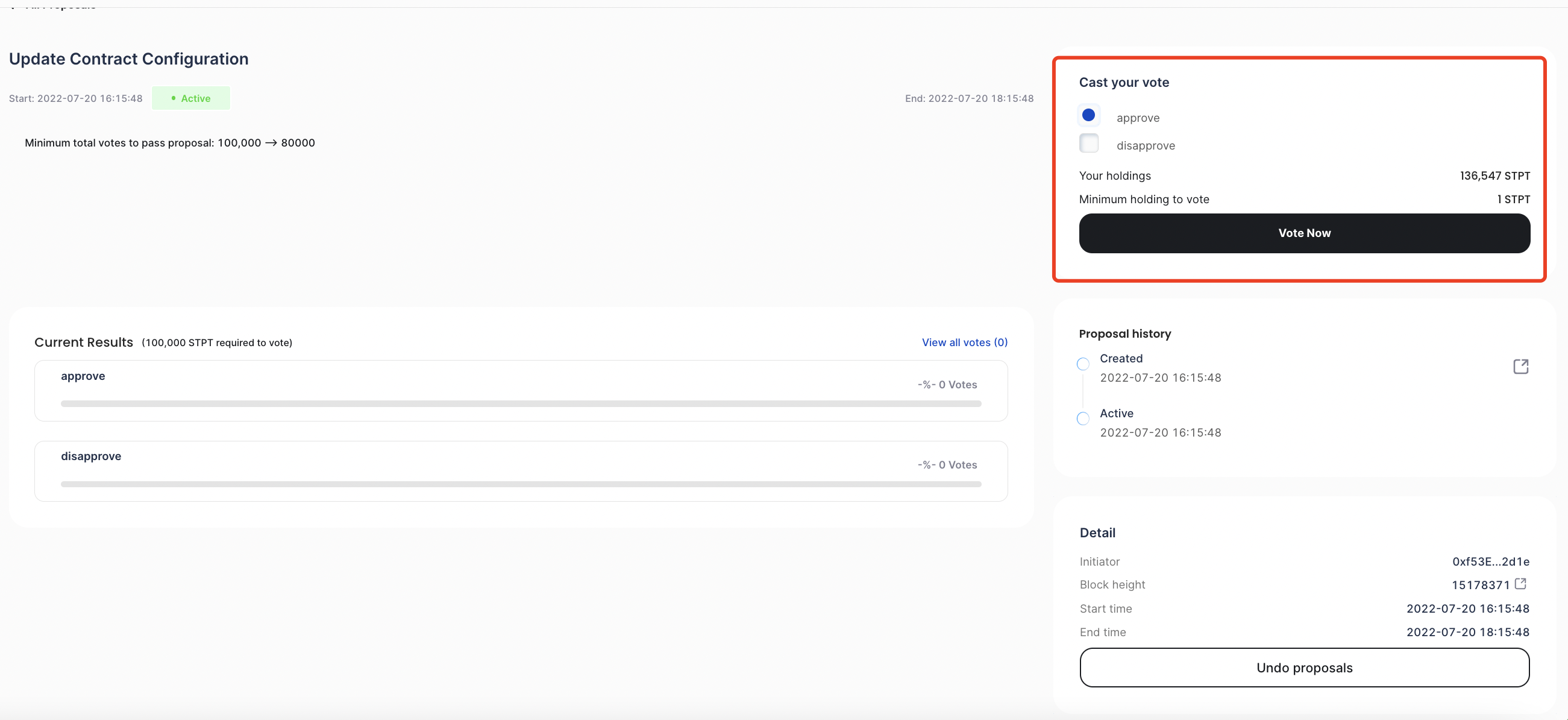
You can check out the voting status anytime by entering this proposal page.
